Share on media
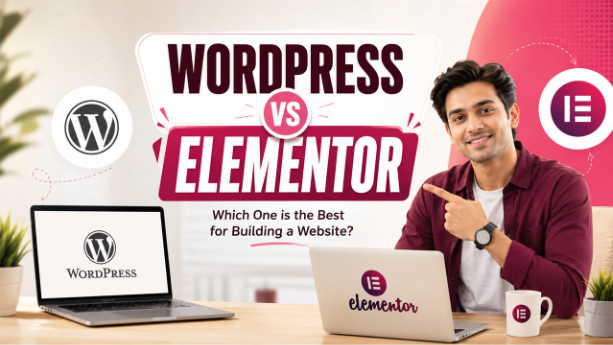
WordPress vs Elementor – If you’ve started thinking about building a website, chances are you’ve heard about WordPress and Elementor. They get mentioned together a lot — sometimes like they’re competing, sometimes they belong together. Honestly, it’s easy to get confused to figure out what each one actually does.
Here’s the short answer to the WordPress vs Elementor question: they aren’t competitors. WordPress is the foundation your website is built on. Elementor is more like a creative add-on, a tool you can use to design and customize the look of your site. You don’t have to use both, but figuring out when you should (and when you really don’t need to) is what this article is going to break down here.
This guide will break down exactly what WordPress and Elementor are, how the work together, and some real-world situations where you might choose one. By the end, you’ll have a clear understanding for deciding which tool aligns best with your business goals.
What Is WordPress?
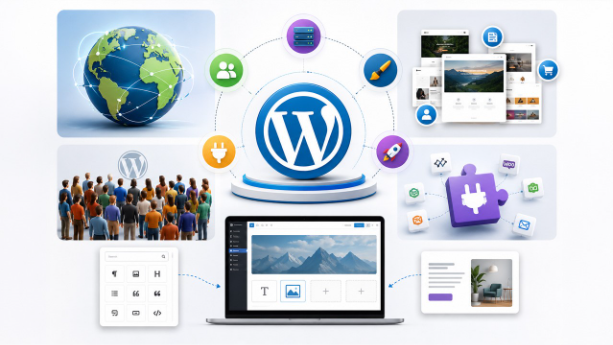
WordPress (Hosted by WordPress.org) is a free, open-source content management system (CMS) that sets the groundwork of your website. That means it acts as a central system that runs your website. It manages everything that runs in the background, like storing your content, managing user accounts, running themes and plugins, and launching your site on the internet.
Launched back in 2003, WordPress has taken over the web. It has become the most widely used website builder across the globe. It runs about 43% of all sites as of May 2026. Just about every type of website you can imagine — from personal blogs to major ecommerce stores — builds on WordPress. There’s a huge community, endless forums full of help, and more than 60,000 free plugins for extra features.
When you set up WordPress for the first time, it comes with its own editor called Gutenberg, or the block editor. Here, you build pages by stacking “blocks” — a block for text, images, buttons, etc. For a lot of basic sites, especially blogs or simple business pages, Gutenberg does what you need and nothing more.
What Is Elementor?
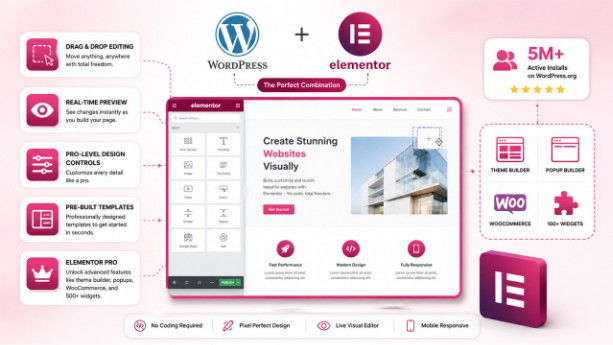
Elementor is a plugin — you bolt it onto WordPress, you don’t use it on its own, and it can’t run without WordPress. It’s not its own platform.
Essentially, it provides you a live, drag-and-drop editor. You don’t have to juggle between “edit” and “preview” — you just see your changes as you make them, right there on the page. This lets you get what you build, no guesswork involved.
Here are some reasons why people love Elementor:
- Drag-and-drop Editing– You can move anything, anywhere — no more rigid block patterns.
- Real-time Preview– By seeing all the changes instantly, it eliminates the need to click back and forth to see previews.
- Pro-level Design Controls- Adjust spacing, tweak colors, fonts, add animations, hover effects, and more.
- Pre-build Templates- Tons of pre-made pag designs mean you don’t need to start from an empty page.
- Elementor Pro- You can upgrade to Elementor Pro ($59/year) to unlock advanced theme building, popup bulder, WooCommerce support, and a giant collection of extra widgets.
Those planning an online store should understand WordPress vs WooCommerce before adding Elementor into the mix.
In short: WordPress is your website’s foundation. Elementor is the design kit you bring in when you want to customize every room. Whether you need both depends on what you want to build.
Why Do People Get Confused?
The confusion usually comes from the word “builder.” Platforms like Wix or Squarespace are true all-in-one website builders — hosting, design, and content all live in one place, and they don’t need WordPress at all. The same reasoning applies when putting WordPress vs Wix side by side.
Elementor gets called a “website builder” too, but it only works inside WordPress. So when people ask “WordPress vs Elementor,” what they’re really asking is: Should I build my pages using WordPress’s default editor (Gutenberg), or should I install Elementor on top of WordPress to design them?
That’s the actual comparison — and the answer depends on what kind of site you’re building.
WordPress vs Elementor: Side-by-Side Comparison
| WordPress (Gutenberg) | Elementor | |
| What it is | CMS — your website’s foundation | Page builder plugin for WordPress |
| Price | Free | Free version available; Pro from $59/year |
| Ease of use | Moderate | Beginner-friendly |
| Design flexibility | Good | Excellent |
| Page speed | Faster (lighter code) | Slower without optimization |
| SEO performance | Stronger | Good with proper setup |
| Vendor lock-in | None | Yes — removing Elementor can break pages |
| Best for | Blogs, content sites, and scalable designs | Custom pages, landing pages, agencies |
WordPress vs Elementor: A Detailed Break Down
Ease of Use
If you want a drag-and-drop experience, Elementor is the easier choice, especially if you’re new to building websites. You drag elements onto the page, tweak settings in a panel, and see the changes instantly. It’s straightforward and honestly kind of fun.
WordPress’s default editor, Gutenberg, uses blocks. It’s actually an ideal platform for writing and managing content, but when you try to make complex layouts, it can feel a little limited—especially if you’re not into design.
That said, Gutenberg keeps getting better. For adding articles, blog posts, or product descriptions, it’s more than enough.
If you need custom page design, Elementor is the right choice, and for writing and content management: WordPress (Gutenberg) is just smoother.
Design Flexibility
Elementor specializes in providing robust design flexibility where you can manage everything, without writing a single line of code. This includes:
- Column widths and layout structure
- Custom fonts, colors, and typography
- Spacing, margins, padding
- Animations and hover effects
- Responsive design for mobile and desktop
If you go for Elementor Pro, it gets more powerful with a Theme builder where you can design your header, footer, blog post templates, even the 404 error pages, all visually. Gutenberg is catching up, but for anything custom or highly complex designs, Elementor’s still ahead. Designers wanting full visual control often weigh Webflow vs WordPress for the same reasons.
Page Speed
Now here’s something most beginners don’t realize until later. Every element you build in Elementor adds extra code to your pages. So the more widgets, animations, and visual effects you layer in, the heavier your site gets—and that slows down your load times.
Gutenberg, on the other hand, produces cleaner, lighter code out of the box. If you pair Gutenberg with a fast, lightweight theme, your site tends to be lean and quick, which matters because:
- Google rankings rely on page speed: Slow sites can lead to lower ranking on search engine result pages.
- Visitors abandon slow sites quickly: A small delay in page loading can significantly increase bounce rates and reduce engagement.
This doesn’t mean Elementor-built sites can’t be fast. With optimized images, caching, and good hosting, they can perform well. Out of the gate, Gutenberg gives you a speed advantage.
SEO (Search Engine Optimization)
Both editors can handle SEO well when set up properly. The difference is in the starting point. WordPress’s Gutenberg editor produces clean, semantic HTML that search engines read easily. Add an SEO plugin like Yoast or Rank Math, and you’ve got a strong technical foundation.
With Elementor, the extra code can sometimes mess with Google’s Core Web Vitals — means a set of page performance scores. Issues with how fast the page visually loads (Largest Contentful Paint) or unexpected layout shifts (Cumulative Layout Shift) can creep in on heavily designed Elementor pages.
The Good news: Elementor’s gotten better here, and with the right tweaks, your site can rank just fine. But it takes more effort to get it there. So, Gutenberg is just the easier starting point for SEO.
Pricing
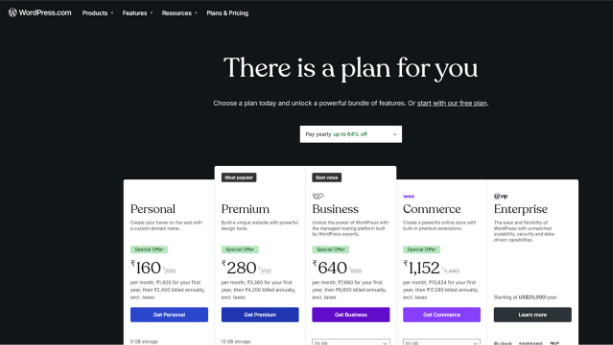
- WordPress: Completely free. You pay for hosting ($3–$15/month typically) and a domain name, but the software itself costs nothing.
- Elementor: Offers a free version with strong basic features. The Pro version starts at $59/year for one site, going up to $399/year for agency-level plans with unlimited sites.
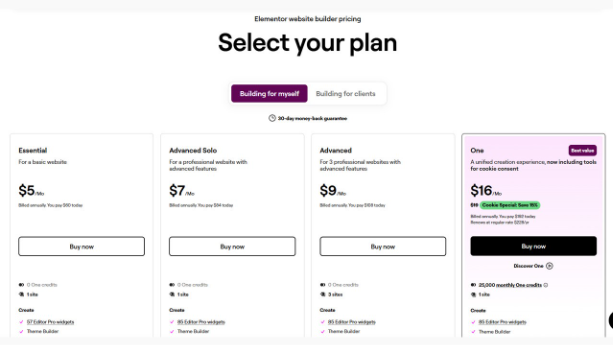
If your budget is tight, WordPress alone keeps things affordable. If you’re ccreating a professional business site, Elementor Pro with an annual fee of $59 is pretty reasonable for what you get.
Lock-In and Flexibility
This one’s easy to overlook but genuinely important. With WordPress’s native editor, your content is stored in clean, portable HTML. Switch themes, change hosts, move platforms — your content stays intact.
Elementor stores its page designs in its own format. If you ever decide to remove Elementor, the pages built with it can break or go blank. Getting your content out cleanly is painful and time-consuming. Plugin not working in WordPress is a common issue when Elementor updates conflict with your setup.
So if you’re thinking about flexibility and long-term health of your site— going native WordPress is the safer option.
WordPress vs Elementor for Website Maintenance and Updates
The choice between WordPress and Elementor can also affect how easily you maintain a website over time. A WordPress website built mainly with the native editor generally has fewer visual design dependencies, which can make routine content updates simpler. You can edit text, images, and page sections without relying heavily on a separate visual builder.
Elementor can make design changes more convenient, especially when a website contains custom layouts. However, websites that depend heavily on a page builder may require more care when updating themes, plugins, or WordPress itself. Before applying major updates, it is wise to create a backup and check whether important pages still function as expected.
This becomes especially important for businesses that frequently change their website structure. Planning the site hierarchy in advance and following a clear approach to How to Structure Your WordPress Website can make future updates easier and help keep content organized as the website grows.
WordPress vs Elementor: Which One Should You Use?
Choose WordPress (Gutenberg) if:
- You’re designing a blog, portfolio, or content-heavy website
- SEO and page speed are the primary needs for you
- You want something simple and affordable
- You’re looking for a straightforward tool with no learning curve
Add Elementor to WordPress if:
- You need a visually custom homepage or landing page without writing code
- You’re a freelancer or agency creating client websites
- You want unique designs and full visual control
- You want to use pre-built templates to accelerate your process
Which Option Is Better for Scaling a Website?
A website may start with only a few pages but gradually expand into a much larger platform with blog content, landing pages, product pages, and additional functionality. Because of this, your choice should also consider how easily the website can grow without becoming difficult to manage.
WordPress offers a broad foundation for expansion because you can add new functionality through themes, plugins, custom development, or different editing approaches. Elementor can also support larger websites, but the way pages are built and maintained becomes increasingly important as the number of custom layouts grows.
For a small website, either option may work well. For a growing website, the better choice is the one that matches your long-term workflow. A simple content-focused site may benefit from a lightweight setup, while a design-heavy website may benefit from a visual builder that gives the team more control over page layouts.
It is also important to consider how you will handle unexpected technical problems as your site grows. For example, server-side problems can sometimes affect website availability, so understanding issues such as a 504 Error can help website owners respond more effectively when a site becomes slow or temporarily unavailable.
The Final Verdict: WordPress vs Elementor
WordPress and Elementor aren’t actually rivals—Elementor needs WordPress to run. The only real question is, do you want to use WordPress on its own or add Elementor on top?
For most bloggers, small businesses, and newcomers, WordPress with Gutenberg gets the job done. Add a good theme and an SEO plugin, and you’re in great shape. But for designers, agencies, or anyone who needs a website to achieve a highly specific look without relying on a developer, upgrading to Elementor Pro is a strategic choice.
And if you’re a beginner with zero technical knowledge, start simple with WordPress. You can always add Elementor later. Going the other way—removing Elementor after you’ve built the whole site with it—is way more trouble.
Meta Description: WordPress vs Elementor: Explore how each editor does, how they are different, and which option makes sense for creating your business or blog site.
FAQs :
Is Elementor the same as WordPress?
No. WordPress is a content management system used to create and manage websites, while Elementor is a visual page builder that works with WordPress. Elementor helps users design pages using a drag-and-drop interface, but it does not replace WordPress itself.
Can I use WordPress without Elementor?
Yes. You can create and manage a complete website using WordPress without installing Elementor. WordPress includes its own native block editor, which is suitable for creating pages, blog posts, and other website content.
Is Elementor better than the WordPress block editor?
It depends on your needs. Elementor may be better for users who want detailed visual design controls and drag-and-drop editing. The WordPress block editor can be a better choice for users who prefer a simpler editing experience and a more lightweight website setup.
Does using Elementor slow down a WordPress website?
Elementor can affect website performance depending on how it is used. Large page layouts, excessive widgets, animations, and additional plugins can increase page size and loading time. Using optimized assets, quality hosting, caching, and a clean design can help maintain better performance.
Should beginners use WordPress or WordPress with Elementor?
Beginners can use either option. WordPress alone may be easier for users who mainly want to publish content and manage a simple website. WordPress with Elementor may be more suitable for beginners who want greater visual control over page layouts without writing code.
%201.png)

%201.png)

%201.png)