Share on media
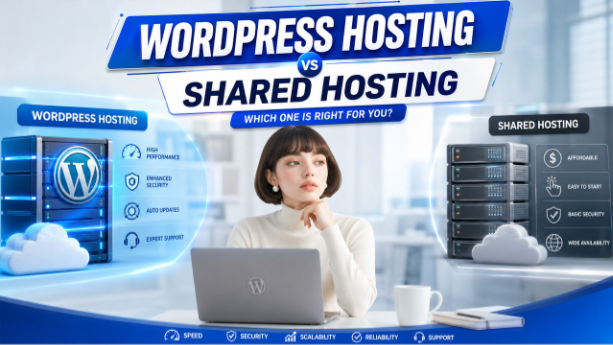
One of the most crucial choices you’ll make when setting up a new website is what web hosting service to choose. If you want to pick the best hosting for getting your site online, it is very important that you understand the difference between WordPress hosting vs shared hosting.
Shared hosting is the most affordable and the easiest option for beginners, but WordPress hosting is the one that is better suited for improving the performance, security and speed of WordPress websites. Choosing the wrong hosting option can affect the reliability and growth potential of your website.
To understand WordPress hosting vs shared hosting well, it would be better to analyze these two kinds of hosting solutions from the perspective of the four main factors including pricing, performance, security, and scalability in order to find the most suitable one.
Shared hosting is the most affordable and easiest option for beginners. However, if you’re still deciding on the right platform, you may also want to explore how WordPress compares with Joomla.
What Is WordPress Hosting?
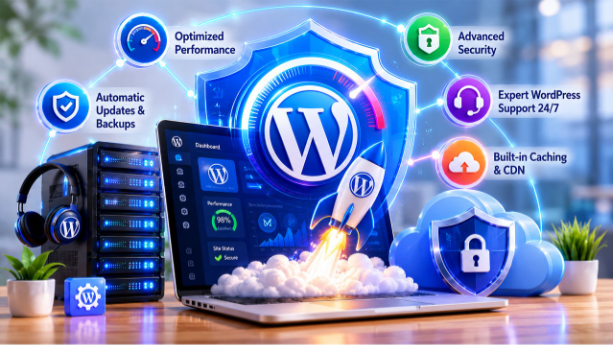
WordPress hosting, also known as Managed WordPress hosting, is a type of hosting service that is specifically optimized for WordPress sites. Managed WordPress hosting is a type of hosting service that is specifically optimized for WordPress sites. For enterprise-level solutions and large-scale architecture differences, you can also compare WordPress with platforms like Sitecore used by large organizations.
The server is set to provide enhanced performance, security, and speed for WordPress users. Mostly, providers also provide functions like daily backups, advanced caching, and even malware protection, besides automatic WordPress updates.
WordPress hosting plans generally offer support teams that are experts at solving WordPress issues rapidly and effectively, unlike standard hosting plans. Some of the well-known WordPress hosting companies are Kinsta, WP Engine, SiteGround and Cloudways. In order to choose a WordPress host, you have to get to know more about what WordPress is and how it operates.
| Pros | Cons |
| Optimized performance for WordPress | Higher monthly cost |
| Automatic WordPress updates and backups | Less control over server settings |
| Expert WordPress support 24/7 | Not ideal for non-WordPress apps |
| Built-in caching and CDN integration | Can feel restrictive for developers |
What Is Shared Hosting?

One of the most inexpensive and easy to use types of web hosting is shared hosting. The multiple website hosting model utilizes the same resources on the server, such as CPU, RAM, storage, and bandwidth. Shared hosting is an economical option for a small business or personal website or blog because the server costs are spread across many users. For those looking for a reliable and budget-friendly option, bodHOST Linux Shared Hosting provides an affordable hosting environment for launching and managing websites with ease.
The majority of shared web hosting providers are based on a standard LAMP or LSMP server stack (Linux, Apache/LiteSpeed, MySQL, and PHP) that can be used with a variety of web applications. Shared hosting is usually packed with cPanel, one-click CMS setups, email hosting, database and file management, and is commonplace amongst those just beginning, bloggers, and small businesses.
| Pros | Cons |
| Very affordable | Performance drops under high traffic |
| Easy to get started (beginner-friendly) | Resources shared among many websites |
| Includes basic SSL and email | No WordPress-specific optimization |
| Wide provider availability | Manual WordPress updates and security management |
WordPress Hosting vs Shared Hosting: Head-to-Head Comparison
| Feature | WordPress Hosting | Shared Hosting |
| Ideal For | Businesses, blogs, WooCommerce stores | Hobby sites, personal portfolios, small blogs |
| Performance | Optimized servers, CDN, caching built-in | Variable; degrades under shared load |
| Security | Active malware scanning, WAF, auto updates | Basic SSL; user manages security plugins |
| Support | WordPress experts, 24/7 | General tech support; limited WP expertise |
| Scalability | Easy resource scaling on demand | Requires plan upgrade or migration |
| Cost | $20 – $50/month | $1.99 – $5/month |
| Backups | Daily automatic backups included | Manual or limited automated backups |
| WordPress Updates | WordPress-specific | User-managed |
| Custom Configuration | WP-optimized, limited server access | cPanel access; general configuration |
1. Performance
When it comes to performance, there is a significant difference between WordPress hosting and shared hosting. WordPress hosting has its infrastructure designed with the WordPress platform in mind and features advanced server technologies like NGINX, LiteSpeed and custom PHP configurations. These optimizations make websites load much faster and deal with traffic much efficiently.
In addition to built-in object caching (Redis or Memcached), pages load much faster with a global CDN. The other type of hosting service is shared hosting, which involves hosting multiple websites on a single server and sharing its resources. If the other site on the server is getting lots of traffic, your site can too end up being impacted. If a user visits your site, then a 2-second load time versus a 0.3-second load time can be the difference between bounce and conversion.
For a deeper comparison of how different CMS platforms handle performance and scalability, you can also explore WordPress vs Drupal.
2. Security
Security is a key factor when it comes to WordPress hosting vs shared hosting dispute. WordPress hosting companies keep a watchful eye on your website to prevent malware, auto-update WordPress security patches and deploy Web Application Firewall (WAF) to ward off attacks before they can hit your site. When using shared hosting, you are largely on your own when it comes to WordPress security. Manual updates and forgetting to install security plugins (Wordfence or Sucuri) or responding to breaches manually.
Furthermore, other sites on the same server, that are compromised, may be able to spread malware to your site from time to time. Add a sturdy one-click WordPress setup process with hardening steps from the beginning to any type of hosting to complement the security.
3. Cost
WordPress hosting is available for as little as $20 to $30 per month for entry-level plans, and much more than $50/month for high-traffic sites. When you consider how much time is saved on maintenance, the expense of security plugins on shared web hosting and the money spent from the impact of performance issues, WordPress hosting can be more cost-effective for any serious website.
One thing shared hosting does have the edge of smaller websites is cost. The shared hosting plans are priced between $1.99 and $5 per month, which is a budget-friendly option for all those who are starting a website, especially for bloggers, students and those who have a limited budget.
4. Scalability
WordPress hosting is scalable so that it grows with your website. When traffic surges, most managed hosting providers have the ability to quickly adapt their resources to meet the demands of that traffic, ensuring that your site does well during the heavy hours. Since a shared hosting website hosts many websites, resources are limited.
When your site begins to get a lot of traffic, the performance might start to slow down or a VPS or dedicated hosting plan will be necessary. This may include manual migration, and possible downtime.
5. Support Quality
WordPress hosting guarantees quick support response times. WordPress hosting companies usually have 15-minute response times. Availability of help nonstop resolves problems immediately. This form of web serving is mainly committed to keeping WordPress wide area network operational and customers happy. Shared hosting packages get overloaded during rush hours causing delays. Not many personnel for expediting repairs.
6. Control Panels
WordPress hosting provides WordPress-specific dashboards that make tasks such as SSL setup, backups, caching and updates much easier. These panels are created to be used specifically for WordPress administration, making website administration quick and simple. Most WordPress optimization tweaks require extra plugins or manual adjustments when using shared hosting and are usually handled by general control panels such as cPanel or Plesk.
7. Uptime Reliability
WordPress hosting providers consider uptime to be a top priority and use load balancing, backup systems and infrastructure that can handle traffic surges without compromising their performance. When multiple sites are hosted on a single server, as with shared hosting, reliability is lessened because heavy traffic can impact on the downtime of the site.
8. Database Optimization
WordPress hosts include features that optimize the database performance in WordPress environments such as query caching and automated database maintenance. This improves the efficiency of websites when handling a high volume of traffic and speeds up the loading time. Shared hosting allocates database resources to several websites and may make a database query slower during the busy period of a server.
9. SSL Setup
WordPress hosting companies offer free SSL certificates that are set up and renewed automatically, keeping sites safe and secure with ease. Shared hosting also provides SSL support, however, the process of setting up and renewing SSL might be more manual and involve some additional technical procedures for the user.
10. Email Hosting
Shared hosting plans offer a basic email hosting service, and some have the option to create branded email accounts. In addition to website hosting, some WordPress hosts may offer email services, while others specialize in website hosting and recommend using a third-party email service for enhanced deliverability and reliability.
11. Site Migration Support
WordPress hosting companies are generally capable of offering complimentary website migration, and that is handled by their experts, which means this process isn’t likely to bring downtime or data loss. In the shared hosting, website transfer is normally a manual procedure that needs technical expertise and can be tedious for newbies.
12. Domain Management Tools
WordPress hosting platforms may have user-friendly domain management tools that make it simple to manage DNS settings, integrate SSL and connect domains. Shared hosting usually comes with a pre-prepared domain manager (cPanel or other interface), but also offers a more complicated setup where you’ll need more technical expertise and experience.
Final Thoughts: WordPress Hosting vs Shared Hosting
The decision of WordPress hosting vs shared hosting relies on a variety of factors, including
your web site objectives, technical needs, and budget. If you’re still exploring which platform suits your needs, comparing WordPress with Wix for simplicity-focused websites or Drupal for advanced scalability requirements can help refine your decision further.
Shared hosting is a budget-friendly solution for newbies, personal websites, and small websites that don’t need high performance or scalability. On the other hand, WordPress hosting is provided to improve website performance, security, uptime, and better management of websites, which is great for business websites, expanding blogs, and WooCommerce stores.
WordPress hosting is an investment for greater performance, expert support, and less technical hassle. While shared hosting is not the best option for large businesses, it is still a good choice for small businesses. Regardless of which one you select, you can use an appropriate WordPress setup and strong marketing platform to optimize your website’s performance and growth.
Frequently Asked Questions: WordPress Hosting vs Shared Hosting
Is WordPress hosting better than shared hosting?
Yes, in most cases. WordPress hosting features much better performance, protection and assistance that is particularly optimized for WordPress. Only shared hosting is good if budget is the major factor, and you have very low traffic.
Can I run WordPress on shared hosting?
WordPress can be installed and used from a shared hosting plan with one-click installers. But, if hosting is not WordPress specific, performance and security will be lower than with dedicated WordPress hosting.
How much does WordPress hosting cost compared to shared hosting?
Shared hosting costs $1.99 – $5/month, WordPress hosting cost varies between $20 – $50/month. Managed services such as automatic updates, security, backup and expert support are included in the higher price of WordPress hosting.
Which hosting type is better for SEO?
WordPress hosting for SEO helps it load faster, have better uptime, and perform better on the Core Web Vitals for better SEO rank.
Can I migrate from shared hosting to WordPress hosting later?
Absolutely. The majority of WordPress hosting companies will provide you with complimentary migration support. Many people begin from shared hosting and then upgrade later on to dedicated hosting. Just note, however, that some downtime planning is required for migration, and the earlier the better to switch, the smaller and less complex your site.
%201.png)

%201.png)

%201.png)