Share on media


Imagine staying up late to work on your WordPress website, and then suddenly you see your screen going blank. You try to refresh but nothing loads. Your heart drops when you realize that your website might have crashed. The feeling becomes more intense when you notice that you do not have any backups. Those who have worked on the WordPress website aggressively know this feeling. This is why it is important to take WordPress backups seriously. A lot of users prefer Duplicator to manage their website as it is simple-to-use and reliable.
However, it is true that what works for us might not be the right fit for you. For instance, a busy WooCommerce store requires distinct backup features than a developer handling different client websites or even a single blog. So, irrespective of whether you are searching for a solution with standard features or a premium plugin with sophisticated capabilities, we have got you covered. Let us show you the most effective WordPress backup plugins and compare their features, advantages, disadvantages, value for cost, etc.
How to Choose the Best WordPress Backup Plugin
Not every backup plugin is designed for the same type of website. A personal blog may only need weekly backups, while an eCommerce store or membership website requires automatic, real-time backups to avoid losing customer orders or user data.
Before choosing a plugin, consider these factors:
- Automatic Backup Scheduling: Choose a plugin that lets you schedule backups daily, weekly, or even hourly based on how frequently your content changes.
- Cloud Storage Support: Storing backups on services like Google Drive, Dropbox, Amazon S3, or OneDrive keeps your data safe even if your hosting server fails.
- Easy Restoration: A backup is only useful if restoring it is simple. Look for one-click restore options that minimize downtime.
- Incremental Backups: Instead of backing up your entire website every time, incremental backups only save new or modified files, reducing storage usage and speeding up the process.
- Migration Features: If you plan to switch hosting providers or move your website, choose a plugin that includes migration and cloning features.
- WooCommerce Compatibility: Online stores need plugins capable of backing up orders, customer information, and transaction data without interruptions.
- Security Features: Encryption, malware scanning, and off-site backups provide an additional layer of protection against hackers and ransomware attacks.
Choosing the right plugin depends on your website’s size, traffic, and recovery requirements. Spending a little more on a reliable backup solution can save countless hours of work if your website ever experiences data loss.
WordPress Backup Plugins: Best Options in 2026
| Name | Best for | Starting Price | Free Version |
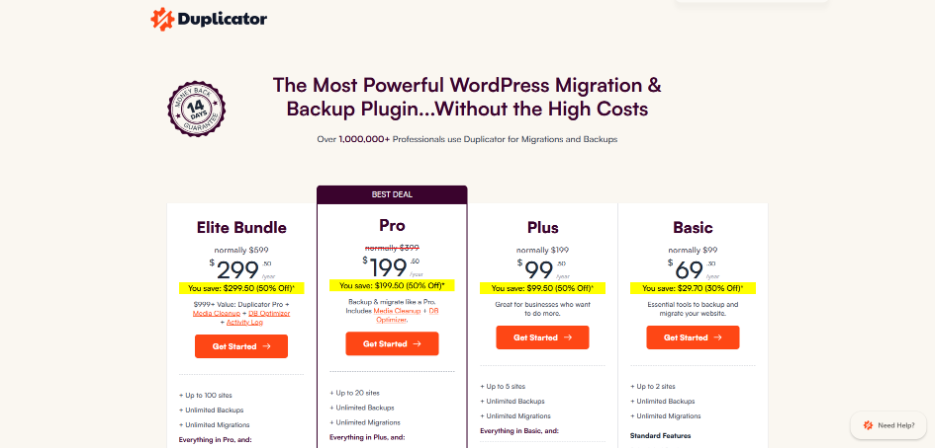
| Duplicator | Overall best backup solution for WordPress | $69/year | Yes |
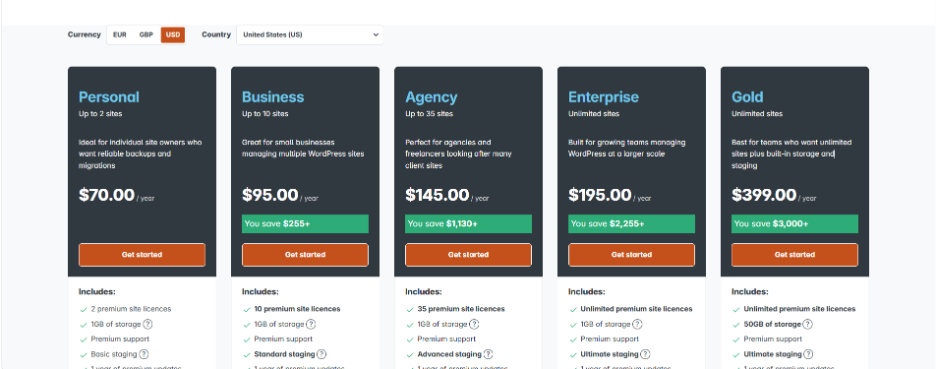
| UpdraftPlus | Remote storage WordPress backups | $70/year | Yes |
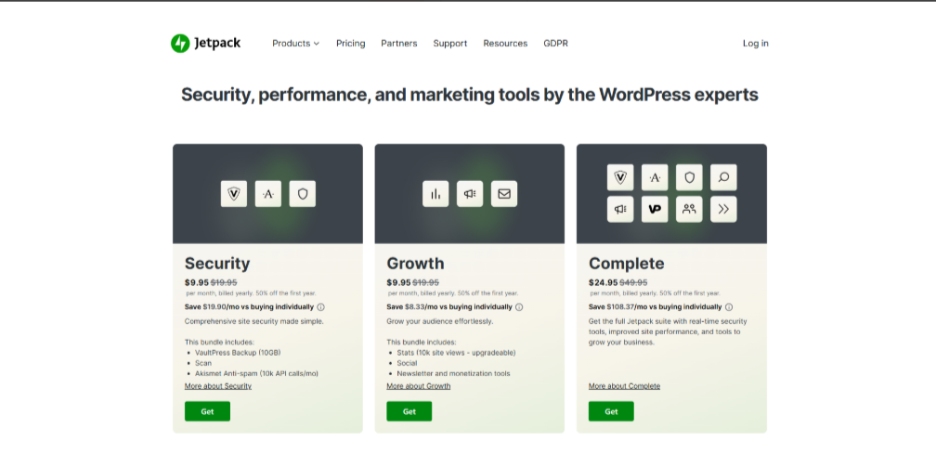
| Jetpack Vault Press | Large online store/website backups | $9.95/month | Yes |
| Solid Backups | Cloud-based WordPress backups | Free and custom advanced plan | Yes |
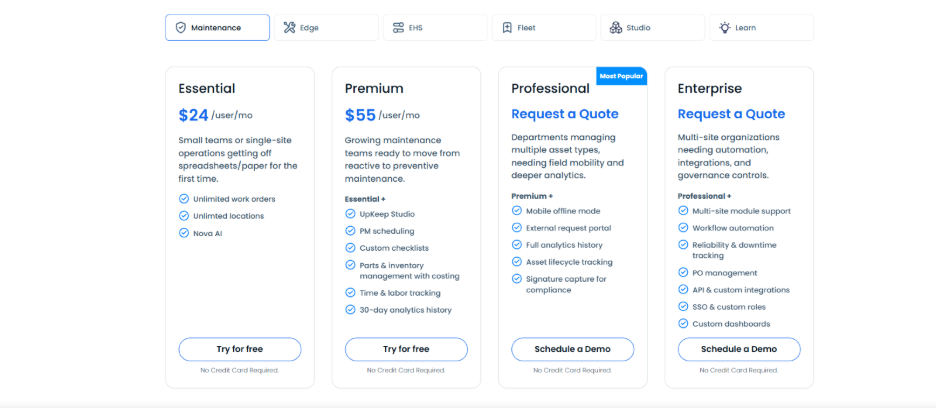
| Total Upkeep | Budget-friendly WordPress backups | $24/user/month | Yes |
| Blog Vault | SaaS-based WordPress backup solution | $49.50/year (with discount) | Yes |
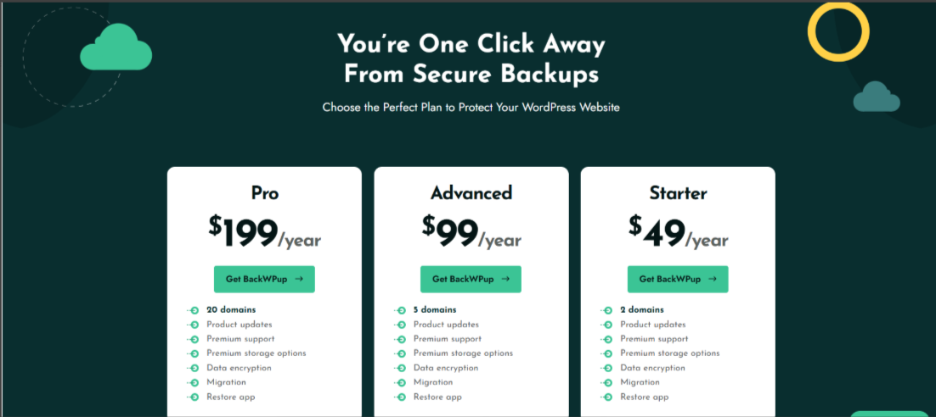
| BackWPup | No-frills backup solution | $49/year | Yes |
Duplicator:
With close to 1.5 million active installations, it has become an extremely effective and prominent WordPress backup solution for both starters and professionals. Plenty of websites use it as a backup solution, and it has proven to be extremely reliable for them. You can use it for partial custom backups to save particular parts of your website without taking up a lot of space. What you would like about Duplicator is how simple it is to use. Even teams with zero WordPress backup experience can instantly tell what buttons they need to click and what they need to do step-by-step as the wizard is simple-to-understand.
Advantages of Duplicator:
- Cloud storage integration with Google Drive, Dropbox, Google Drive, and Amazon S3.
- Its capability to ensure partial or complete backups is its most advantageous aspect.
- User-convenient backup recover wizard for simple restoration.
- Sophisticated migration features, including multisite support.
- Feature of disaster recovery, which enables you to assign a backup file without having to sign in.
- Large website support for complex migrations.
Disadvantages of Duplicator:
Even though the free version is valuable for small websites, you will get higher value for your money if you upgrade to the Pro version.
Pricing: Users can start with the free plugin version. The paid plans begin at $69/year.
Updraft Plus:
Updraft Plus is one of the few WordPress backup and migration plugins that provides extensive remote storage integrations in its free version without needing a premium upgrade. Reviewers choose Updraft Plus among distinct freemium backup plugins due its generous features. It enables you to connect with remote storage providers such as Dropbox, Google Drive, and Amazon S3. In simple terms, you will not have to upgrade to a premium version just to access such integrations.
Another thing users like about Updraft Plus is its automatic scheduled apps. You can prefer to implement the backup schedule monthly, weekly, daily, or between 2-12 hours. This automation makes sure that your website is always secure without needing manual intervention.
Advantages of Updraft Plus:
- Free integration with cloud storage services such as Dropbox, OneDrive, and Google Drive.
- You can restore backups with just one click right from the WordPress dashboard.
- Provides support to both partial and complete backups.
- Supports incremental backups
- The easy-to-navigate interface to manage backups.
- Email notifications for completion of backups and any possible issues.
Disadvantages of Updraft Plus
The free version does not have security characteristics people consider vital, such as encryption of data.
Pricing: You can either opt for a free version of the plugin or go for paid plans that start at $70/year.
Jetpack VaultPress Backup:
As an official backup solution from Automattic, the company that builds WordPress.com, Jetpack VaultPress Backup is a dependable choice for enterprises. People like Jetpack because it creates backups without impacting the performance of your website. The backups operate on Jetpack servers instead of your hosting server. This implies that your backup remains fast even during backup operations.
If you operate a WooCommerce website, you will appreciate the capability of Jetpack to restore your website while making sure that your customer data and latest orders remain intact. This implies that if you do not lose any recent sales data even when you are restoring an older backup version.
Advantages of Jetpack VaultPress Backup:
- Backed by enterprise-grade infrastructure and security expertise of Automattic.
- Backups operate on external servers, avoiding performance impacts on your WordPress website.
- Simple process of one-click restoration for partial and full backups.
- From our experience, the feature of malware scanning is a great option for detecting and alerting you about possible security threats.
- Direct support from the expert team of WordPress.com.
- Incorporate with other valuable Jetpack features such as security tools and CDN.
Disadvantages of Jetpack Vaultpress Backup:
A few users can find the storage limits restrictive since 30-day archive and 10 GB of daily backups is not sufficient for many websites.
Pricing: A free version of plugin is available. Paid plans start at $9.95/month.
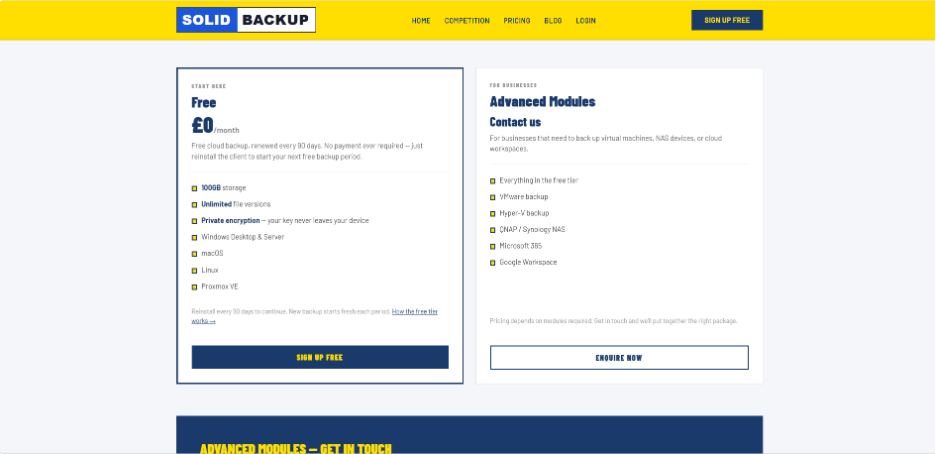
Solid Backups (WordPress-powered):
Solid Backups NextGen is a cloud-driven WordPress backup solution. Users mainly appreciate how it offloads the process of backup to its own servers instead of utilizing its own hosting resources. The smart incremental system of Solid Backups is also highly rated. Once your first backup is done, it only saves changed files instead of repeatedly backing up your entire site. This not just saves storage space but also makes the process of backup a lot faster. To further reduce the size of backups, you can periodically clean up old themes periodically from your WordPress site.
Other than that, you can trigger automated backups to run at intervals, hourly, daily, or twice daily. This flexibility is highly suitable for busy websites where the content is frequently changed.
Advantages of Solid Backups:
- Cloud-driven backups that do not stretch the resources of your hosting server.
- Smart system of incremental backups that only save modified files.
- One-click feature of restoration for quick site recovery.
- In-depth activity timeline for simple backup tracking and restoration.
- Industry-standard AES 256 encryption to secure your WordPress content.
- All features are available for all users irrespective of the plan they are using.
Disadvantages of Solid Backups:
The only caveat that you should know is that the plugin is compatible with numerous hosting providers such as Flywheel, WP Engine, and Pressable.
Pricing Plan: There is a free option, and there is custom pricing for advanced modules.
Total Upkeep (Cost-effective Backup Solution):
As one of the most cost-effective backup solutions in the space of WordPress, Total Upkeep provides a great range of features at just $2.50/month. The plugin is greatly helpful for small business owners who require a dependable backup without a high price tag. Contrary to other backup plugins that create backup plugins simply, it involves a feature of site check that scans actively for possible issues before they can trigger data loss. This can enable you to catch numerous issues before they become major problems.
Advantages of Total Upkeep:
- The plugin can create backups automatically before software updates to avoid unexpected problems.
- A feature of site check for proactive detection and prevention of issues.
- Flexible scheduling of backups with selection of custom file and database table.
- In-depth backup archive with restoration options at file level.
- Emergency restoration script for comprehensively crashed website.
Disadvantages of Total Upkeep:
A few users have reported problems with respect to subsequent backups after their early successful backups.
Pricing: You can either use the free plugin or go for a paid plan that starts at $24/user/month.
BlogVault (SaaS-based WordPress Backup Solution):
BlogVault is mainly a SaaS solution rather than a WordPress solution. It means that it instantly creates WordPress backups on BlogVault servers to prevent any load on the server. It is referred to as the zero-footprint strategy.
One of the notable aspects of BlogVault is how it manages WooCommerce backups. It can capture the changes in real-time to customer data and orders. This is significant for e-commerce websites where every transaction is important.
What makes BlogVault different from the rest is its comprehensive tracking system. It can keep track of your uptime, backups, scan for potential malware, and even track your Core Web Vitals. All of this happens via the one centralized dashboard.
Advantages of BlogVault
- There is no impact on server performance since Backups operate on the servers of BlogVault.
- WooCommerce backup capture in real-time for vital order data.
- In-built malware scanning and firewall for web applications.
- Automatic validation of backups and testing capabilities, which is valuable for making sure that backups operate in a proper way.
Disadvantages of BlogVault:
The pricing point is slightly higher compared to other backup solutions on the list.
Pricing: You can test the plugin with a 7-day free trial. Paid plans start at $99/year.

BackWPup (No-Frills Backup Solution):
If you are looking for a solution with no-frills backup that just works well, BackWPUp is a preferable choice. This plugin keeps things straightforward. You can create as well as restore comprehensive WordPress backups right from your dashboard without being completely overwhelmed by the complex settings.
The plugin follows a simple philosophy of “set it and forget it.” Create backup jobs to schedule automatic backups, select where to store them, and directly restore them from WordPress whenever required.
For users who desire better control, BackWPup adds additional features. These involve remote storage integrations, a wizard for system tests, and premium support.
Advantages of BackWPup:
- The interface is extremely simple as well as clear, so it does not overwhelm the users with options.
- Comprehensive restore and backup functionality in the free version.
- Simple to schedule automatic backups.
- The renewal prices come in affordable ranges.
Disadvantages of BackWPup:
BackWPup can restore the backups only created by the plugin.
Pricing: Pricing plans start at $49/year. You can go for a free plan instead of testing the plugin first.
Best Practices for WordPress Website Backups
Installing a backup plugin is only the first step. Following backup best practices ensures your website can be restored quickly whenever something goes wrong.
Here are some recommendations:
- Keep multiple backup copies instead of relying on a single backup file.
- Store backups in remote cloud storage rather than only on your hosting server.
- Test your backups regularly to ensure they can actually be restored.
- Schedule automatic backups based on how often your website changes.
- Keep backup plugins updated to maintain compatibility with the latest WordPress version.
- Delete outdated backups periodically to save storage space.
- Before installing a new theme or plugin, create a fresh backup.
If you’re troubleshooting after installing a new plugin, you may also want to read our guide on plugin not working in wordpress, which explains common causes and proven fixes before restoring your website from a backup.
For multilingual websites, don’t forget to back up language files as well. If you’re planning to build a multilingual website, check out our guide on WordPress Translation Plugins to choose the right solution while keeping your translated content protected.
Conclusion
Selecting the best WordPress backup plugin mainly depends on your particular budget as well as requirements. Duplicator stands apart as the most effective all-around option, providing an innovative interface, flexible backup options, and powerful features of migration most suitable for professionals and beginners alike. UpdraftPlus is an ideal option if you require generous free-tier cloud storage integrations, while Jetpack VaultPress serves WooCommerce stores better. Solid Backups and BlogVault is a suitable option for users that are performance-conscious, and BackWPup or Total Upkeep suits the ones on tighter budgets.
Verdict: Though the right option depends on your need and budget, if you must choose one, go for Duplicator as it is the most preferred option for WordPress users.