Share on media



If you are still running a service-based company without an online scheduling platform, then you are doing it wrong. It is impractical to manage bookings and plugins nowadays without a streamlined system to manage them. Manually managing customers through emails or phone calls can lead to inaccuracies and make your calendar chaotic. Customers expect to book appointments at their convenience and need a simple interface. A reliable WordPress booking plugin solves this problem by automating the complete process, from displaying availability to collecting payments and confirming appointments.
Irrespective of whether you run a consulting firm, a salon, a wellness center, or a medical practice, the WordPress appointment booking plugin can greatly enhance how you can cater to clients. In this detailed blog, let us explore what these plugins are, what characteristics are most important, and which options you should pay attention to in 2026.
What Is a WordPress Booking Plugin?
A WordPress booking plugin is a platform that adds the functionality of appointment scheduling directly to your WordPress website. Instead of depending on third-party tools or phone-based scheduling, it enables visitors to select available time slots, book services, and finish the payment process without having to leave the website.
Such plugins generally involve:
- A front-end calendar or booking form that clients can interact with.
- A back-end appointment dashboard for handling your schedule.
- Email notifications for reminders, confirmations, and cancellations.
- Payment gateway integrations to collect fees at the time of booking.
- Calendar sync options with platforms such as Outlook or Google Calendar.
A good WordPress scheduling plugin basically automates your front desk, enabling your business to accept bookings around the clock without needing manual intervention.
Main Features You Need to Look for in a WordPress Booking Plugin
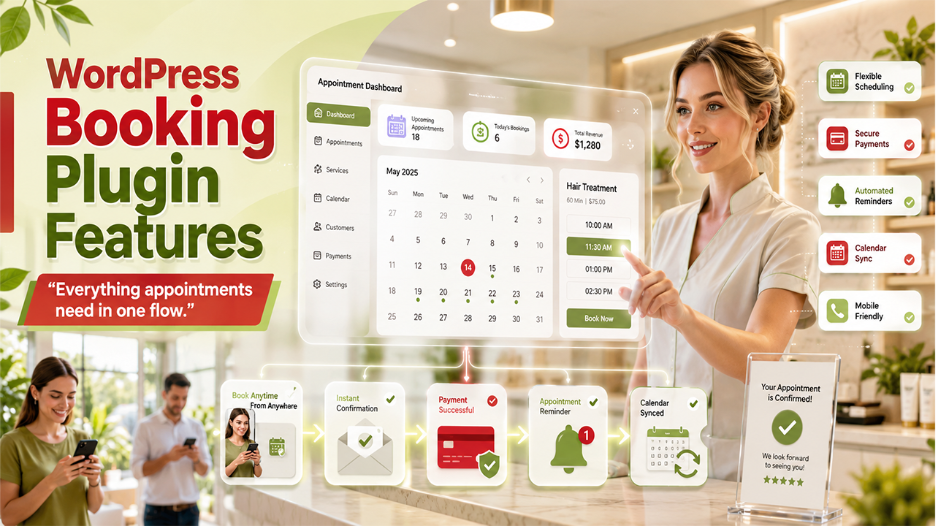
Not every WordPress booking plugin works in the same way. Before you select one, it is significant to assess which characteristics align with your business requirements.
1. Simplicity:
A plugin must be simple to set up and manage, both for you as well as your customers. Look for an innovative admin dashboard and simple and clean booking interface on the front end. Beginners must prioritize plugins that provide setup wizards or drag-and-drop form builders.
2. Flexibility in Appointment Scheduling:
Your online appointment booking solution must enable you to determine service durations, set buffer times between appointments, set up business hours, and block off unavailable dates. The better control you have over the calendars, the better you can manage the customers.
3. Payment Integration:
Accepting payments during booking minimizes no-shows and streamlines billing. The best WordPress booking plugins provide support to payment gateways such as PayPal and Stripe, enabling clients to securely pay during checkout.
If your payment integration stops responding after setup, knowing how to handle a plugin not working in WordPress situation can save you a lot of time and frustration.
4. Reminders and Email Notifications:
Automated emails, confirmation, reminders, and cancellation notices keep both your clients and yourself informed. This feature is vital for minimizing missed appointments and ensuring professionalism.
5. Calendar Synchronization:
Two-way synchronization with Outlook, Google Calendar, Outlook, or iCal makes sure that your WordPress appointment scheduling remains in alignment with any external calendars that you use already. This avoids double-bookings and makes sure that everything remains organized.
6. Mobile Responsiveness:
A major portion of your clients will complete the booking from mobile devices. Your booking plugins for WordPress must cleanly render on tablets and smartphones, with a smooth user experience irrespective of screen size. If you are unsure whether your current site meets the mark, learning how to make a website mobile friendly is a smart first step before installing any booking plugin.
Best WordPress Booking Plugins You Need to Consider in 2026
Let us check out the best booking and appointment plugins in this section:
Sugar Calendar Bookings:
Sugar Calendar Bookings is broadly regarded as the best WordPress booking plugin for service-based businesses. It enables you to set up services with custom duration and pricing, configure availability with minimum notice periods, and allow clients to book time slots around the click. The booking forms are mobile-friendly, clean, and easy-to-embed utilizing shortcodes or WordPress blocks. In-built Stripe integration manages online payments, and the dashboard ensures a clear view of all appointments filtered by date, service, or customer.
- Free version: Available on WordPress.org
- Best for: Full-featured appointment and booking management
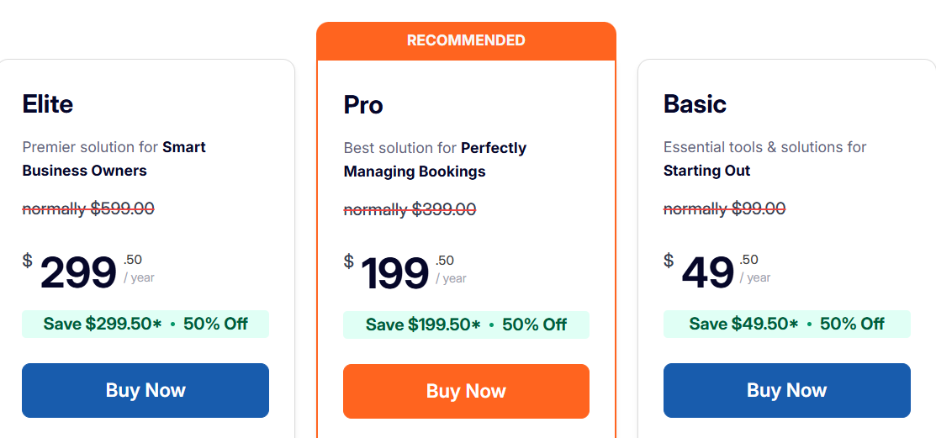
Sugar Calendar Bookings Pricing: It varies between $49-$299/year.
WPForms:
WPForms is best known as a contact form builder. However, it is also extremely effective for generating WordPress appointment booking forms with different payment options. It involves more than 2,000 templates, a drag-and-drop editor, and smooth incorporates with PayPal, Stripe, and Square. For businesses that need a form-based or simple online booking solution without a complete scheduling system, WPForms turns out to be a top-choice.
- Free version: Available (WPForms Lite)
- Best for: Straightforward appointment booking forms with payment collection.
WPForms Pricing: The WPForms pricing varies in the range of $49-$299/year.
Simply Schedule Appointments:
Simply Schedule Appointments is a top choice for small businesses that must showcase real-time availability and handle schedules across numerous team members. It comprises a setup wizard that auto-detects your contact details and time zone, direct integrations with Outlook, Google Calendar, Google Meet, and personalizable calendar layouts. It is specifically well-suited for multi-staff businesses and consultants.
- Free version: Available (limited features)
- Best for: Managing multiple team members and showcasing availability
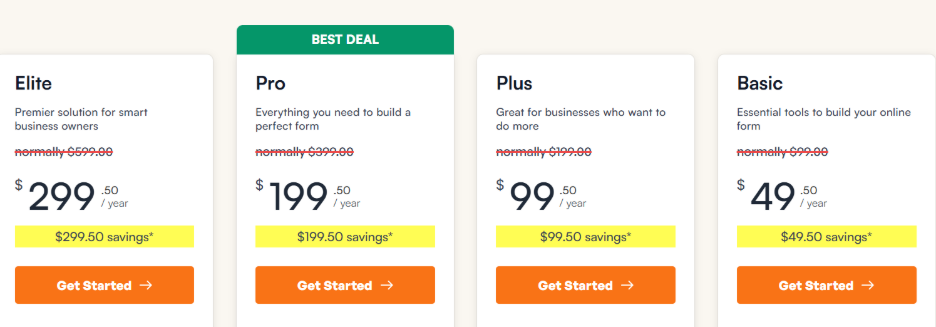
Simply Schedule Appointments Pricing: The “Simply Schedule Appointments” pricing varies in the range of $99/year–$399/year.
Booking Calendar:
Booking Calendar has made its name as the best free WordPress booking plugin available currently. Despite being free, it involves custom form builds, flexible calendar view, in-built CAPTCHA for spam protection, jQuery effects, and email notifications. Sophisticated features like payment gateways are reserved for their paid versions. However, the free tier is ideal for numerous small business use cases.
- Price: Free (paid plans available)
- Best for: Businesses looking for a no-cost and powerful solution.
Booking Calendar Pricing:
The annual pricing plans of Booking Calendar varies in the range of $79-$899.
Easy Appointments:
Easy Appointments is a free and flexible WordPress appointment scheduling plugin that provides support services, multiple locations, and staff members. It provides customizable notification emails, granular calendar control, and mobile-responsive two-column form layout. It is well-suited for in-person service businesses having complex scheduling requirements.
- Best for: In-person services having multiple staff and locations.
- Price: Free
How to Select the Right WordPress Booking Plugin for Your Business?
With numerous options available, the decision mainly boils down to your specific requirements:
- If you require a complete appointment management system with availability control, payments, and client self-service cancellations, Sugar Calendar Bookings is the best all-around option.
- If you only require a booking form to collect payments and appointment requests, WPForms provides flexibility and simplicity.
- If your business has numerous staff members and you want clients to see real-time availability, Simply Schedule Appointments is an ideal choice.
- If you are working with a close budget and require a solution, Easy Appointments and Booking Calendar ensure reliable functionality at no cost.
Take care of different factors like the number of services you are providing, whether you require payment processing or not, whether you manage a team or not, and how significant calendar integrations are to your workflows before making the final choice. If your scheduling requirements are highly specific and no out-of-the-box plugin fully meets your needs, it may be worth exploring custom web development services to build a tailored booking solution for your business.
How to Keep Your WordPress Booking Website Secure
A booking website collects important customer information, including names, email addresses, phone numbers, appointment details, and sometimes payment information. Because of this, security should be a major consideration when setting up an online booking system.
Choose booking plugins that receive regular updates and follow WordPress security standards. Using trusted payment gateways, enabling SSL certificates, limiting user permissions, and keeping all WordPress components updated can help reduce security risks.
Along with plugin-level protection, maintaining proper Website Security practices is essential for protecting customer data and keeping your booking website reliable. Regular backups, malware monitoring, firewall protection, and secure login methods can prevent common security issues and ensure a safer experience for both businesses and customers.
Integrating Your Booking Plugin with Other Business Tools
Installing a booking plugin is only the first step toward streamlining your business operations. To get the most value from your booking system, consider integrating it with other tools that support customer management, communication, and marketing. These integrations help automate repetitive tasks, reduce manual work, and improve the overall customer experience.
For example, connecting your booking plugin with email marketing platforms allows you to send appointment confirmations, reminders, and follow-up messages automatically. Payment gateways simplify online transactions, while calendar integrations help keep your schedule synchronized across multiple devices and team members.
As your business grows, managing customer information becomes just as important as managing bookings. Using CRM Plugins alongside your booking solution allows you to organize customer records, track appointment history, monitor interactions, and build stronger long-term relationships with clients. This creates a more efficient workflow and helps you deliver a personalized experience that encourages repeat bookings.
Conclusion
Choosing the right WordPress booking plugin is one of the most influential decisions you can make for a service-based website. Such tools remove the need for back-and-forth manual scheduling, minimize no-shows via automated reminders, and enable your business to accept bookings at any time of the day.
For the most of businesses, Sugar Calendar Bookings is a preferable WordPress appointment solution, specifically for those who require an integrated system covering payments, services, and schedule management. However, Simply Schedule Appointments, WPForms, Booking Calendar, and Easy Appointments are also preferred by different service-based businesses. Pairing your booking setup with the best SEO plugins for WordPress can significantly improve your visibility and drive more clients to that booking page.
Carefully assess your business needs, test the free versions wherever available, and select a WordPress scheduling plugin that provides support to both your present operations and your growth plans.