Share on media



Anime fandom has grown tremendously, turning into a global community with fans everywhere, and this growth has created strong demand for dedicated online spaces. Whether you want to launch a fan blog, merchandise store, streaming guide, or community hub, developing anime websites on WordPress is one of the most efficient ways to get started. WordPress gives creators complete control over content, design, and functionality without requiring advanced coding skills, making it a practical choice for businesses and anime enthusiasts alike.
In this guide, we’ll explore what an anime website is, the tools you need, and the key steps to successfully launch and manage one using WordPress.
What Is an Anime Website?
An anime website is a digital platform dedicated to anime-related communities, content, or commerce.
Such websites can take various forms such as follows:
- Fan blogs that cover news, reviews, and episode discussions.
- Streaming directories that organize legal viewing links as per the series.
- Merchandise stores sell apparel, figures, and collectibles.
- Community hubs with fan art galleries, forums, and discussion boards.
The main purpose of an anime website is to attract all anime fans with quality content. A well-organized anime website template integrated with a dependable website builder can allow creators to quickly launch such a platform, even without any technical knowledge.
Why Is WordPress a Preferable Choice for Anime Websites?
WordPress powers the majority of websites around the world, and its flexibility makes it ideal for niche content such as anime. Main advantages involve:
- Extensive plugin environment for adding forums, galleries, and e-commerce characteristics.
- Thousands of themes, which also includes the ones specifically built for fan and entertainment websites.
- Scalability that enables a small blog to scale into a complete community platform.
- SEO-friendly architecture that provides support to organic discovery through search engines.
For creators that research anime websites, WordPress remains a reliable foundation since it balances simplicity with lasting personalization potential.
Selecting the Best Website Builder and Template
Choosing a correct website builder is a first practical step. Page builders such as Elementor are broadly utilized for developing visually engaging anime websites without creating custom code. Once you install a builder, the next step is the design layer itself.
An anime website template, which is purpose-built, like the Zoomics template pack specialized for Elementor, can greatly minimize the setup time. Such templates generally involve:
- Pre-built landing pages.
- Layouts that are illustration friendly.
- In-built CTA sections.
- Category structures ideal for anime or comics content.
Utilizing a template pack means creators do not have to create layouts from scratch, which is greatly valuable for those who do not have any design experience.
Anime Content Rights and Publishing Considerations
Before publishing an anime-focused website, it is important to think about where your images, artwork, screenshots, videos, and written material come from. Building the website is only one part of the process; the content you publish should also be appropriate for your intended use.
Create as much original material as possible, particularly for reviews, commentary, tutorials, and community discussions. When using third-party assets, check the relevant licensing terms and avoid assuming that an image found online is automatically free to reuse.
It is also useful to keep your branding and visual choices consistent across the website. Whether you are creating an anime fan platform or taking inspiration from approaches used in Healthcare Web Design, the goal should be to make the site recognizable while ensuring that the content and visual assets are handled responsibly.
Keeping a record of asset sources, licenses, and permissions can also make future content management much easier as the website grows.
Developing Your Anime Website Step-by-
Step on WordPress
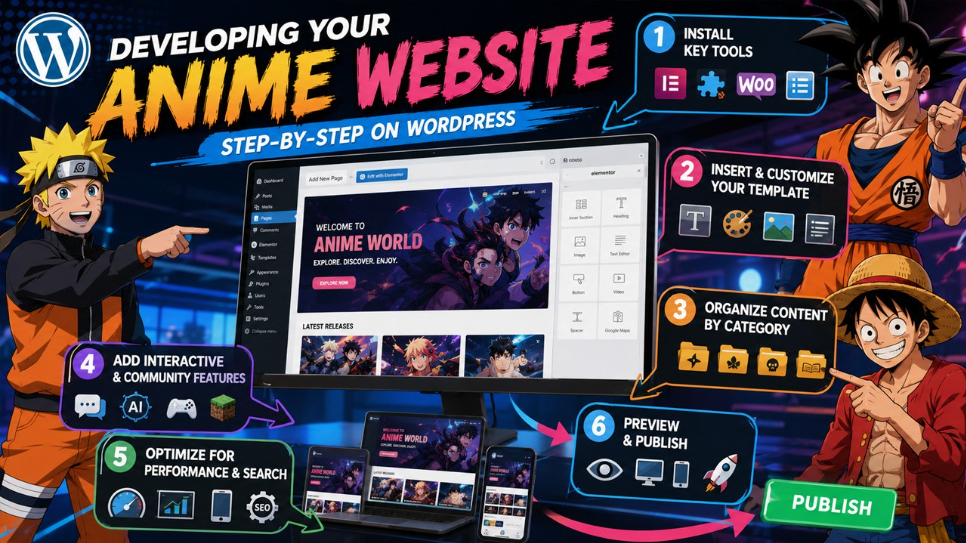
Step 1: Install Key Tools :
Before you design anything, you need to establish the foundational plugins:
- A page builder like Elementor.
- An addon plugin for design elements and extended widgets.
- WooCommerce, if the website sells merchandise.
- A template library plugin to gain access to ready-to-use designs.
Step 2: Insert and Personalize Your Template :
After installation of the required plugin, insert the selected anime website template into a fresh page. The majority of template libraries enables one-click insertion, after which you can personalize the layout with your own:
- Color and branding scheme .
- Typography .
- Illustrations and images .
- Structure of navigation menu .
Step 3: Organize Content by Category :
Anime audiences are highly organized by series and genres. Organizing content enables visitors to clearly find what they desire quickly. Common approaches of categorization involve the following:
- Genre-based sections (isekai, shonen, slice of life, etc.).
- Series-based archives.
- Individual categories for manga versus anime content.
- Different sections for news, reviews, and community discussions.
Step 4: Add Interactive and Community Features :
Plenty of successful anime websites do not stay limited to static content but also integrate interactive elements. For instance, fan communities often times go beyond engagement through platforms such as an Anime AI Chat feature, enabling visitors to interact with anime-themed AI characters on the website directly. Similarly, anime-inspired gaming communities have evolved around modded multiplayer experiences, like Minecraft Server created around the Solo Leveling universe, which shows how anime fandoms venture into the gaming industry as well.
Step 5: Optimize for Performance and Search :
Before publishing is done, make sure that the website is technically sound enough:
- Compress images for quicker load times.
- Leverage SEO plugins to handle metadata.
- Confirm responsiveness of mobile across different templates.
- Set up a crawlable and clear website structure.\
Plan for Database Growth as Your Anime Site Expands
Anime websites can accumulate a large amount of content over time, especially when you regularly publish reviews, episode discussions, news, comments, user submissions, and product information. Much of this activity creates data behind the scenes, so it is useful to think about database maintenance before the website becomes difficult to manage.
Keep an eye on unnecessary revisions, temporary data, unused plugin records, and other database entries that no longer serve a purpose. You do not need to remove data constantly, but periodic maintenance can help keep the WordPress installation organized as more content is added.
Regular Database Optimization can become part of your wider maintenance routine, particularly when the site has been running for a long time or several plugins are creating large amounts of stored information. Always create a current backup before making major database changes.
Planning for database growth from the beginning makes ongoing maintenance easier and gives you a better foundation for expanding the website later.
Step 6: Preview and Publish
Once personalization is done, you can preview the website completely across devices and then hit “Publish.” Regular updates after that, including refreshed categories and new posts, ensure that the visitor engagement is maintained over time.
Build a Final Quality-Check Process Before Launch
Publishing a website should not be the point where you discover broken pages or missing information. Before making your anime website public, take a final walkthrough from the perspective of a new visitor. Open the main navigation, visit important pages, test forms, check images, and make sure internal links lead to the right destinations.
Pay particular attention to pages that are easy to overlook, such as the contact page, category archives, individual posts, policy pages, and any shopping or community features you have added. Check the site on both desktop and mobile so that buttons, menus, images, and text remain usable at different screen sizes.
A WordPress Website Launch Checklist can make this process easier by giving you a structured set of checks instead of relying on memory. Once everything has been reviewed, fix the problems that could affect visitors before promoting the site publicly.
Prevalent Mistakes You Need to Avoid
- Overcrowded Navigation: Different menu items can confuse visitors instead of assisting them.
- Inconsistent Categorization: Mixing series and genres without organized structure makes content difficult to find.
- Ignoring mobile users: A large chunk of anime fans browses through mobile devices. Thus, responsiveness is vital.
- Skipping SEO basics: Without organized structure and metadata, even quality content does not get any visibility in SERP results.
Conclusion
Launching your anime websites on WordPress is a practical step for creators, fans, and businesses alike. By choosing the right website builder, applying a dedicated anime website template, and exploring the TOP 10 Plugins for WordPress Enterprise Website, you can build a more flexible platform with the tools needed to manage content, performance, and growth. With consistent attention to SEO fundamentals and regular updates, your anime website can develop into a valuable long-term destination for fans.
Frequently Asked Questions :
Do I require coding skills to establish an anime website on WordPress?
No. Ready-made templates and page builders enable you to design as well as launch a website without writing even a single line of code.
What plugins are vital for an anime website?
A page builder, addons plugin for additional design elements, and WooCommerce if you are planning to sell merchandise are generally essential.
Can I sell anime merchandise through my WordPress website directly?
Yes. Incorporating WooCommerce enables you to establish a completely functional digital store along with your content.
How significant is categorization for anime websites?
Very significant. Clear categories by series or genre enable visitors to efficiently go through large content libraries.
Are templates of anime website customizable?
Yes. Most templates enable complete customization of fonts, colors, images, and layouts to align with your brand.