Share on media
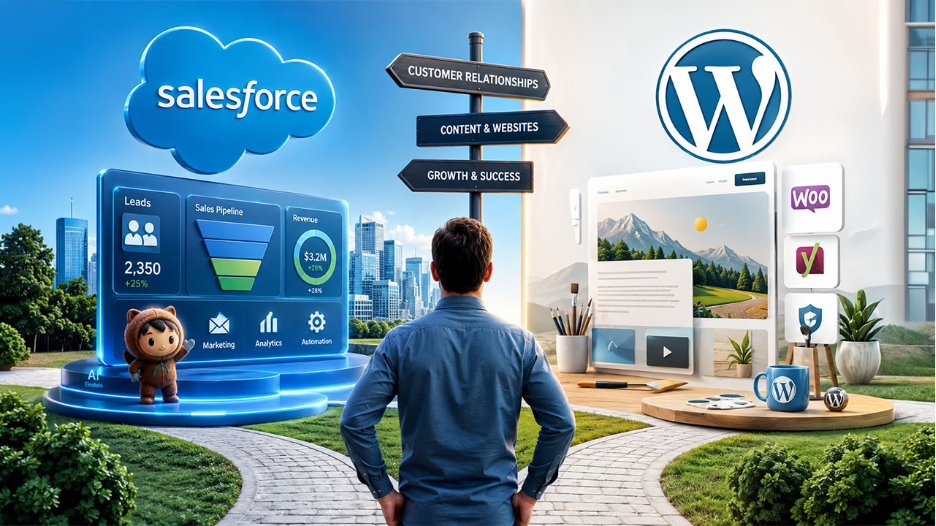
Over 40% of the internet runs on WordPress. Salesforce manages customer relationships for over 150,000 businesses worldwide. Both tools are extremely popular. And yet people keep searching for which one to pick, because they seem similar at first glance. But they serve different purposes. Let’s understand what exactly they are, which one your business actually needs, or if it needs both simultaneously.
What Is Salesforce?

Salesforce started as a simple contact management tool back in 1999. Today, it’s a full cloud-based CRM platform covering sales pipelines, marketing automation, customer support, analytics, and AI, all under one roof.
Consider it as a broad system that your sales and marketing teams live in every single day. Every lead that comes in, every deal in progress till it closes, every email campaign sent out, Salesforce tracks every single activity. Before the salesperson actually gets on a call, Salesforce provides the entire history of the prospect.
Along with the basic functions, Salesforce has grown into a massive ecosystem. This ecosystem covers Marketing Cloud, which handles campaigns, Service Cloud for managing customer support, and Einstein AI, which gives you predictive lead scoring and revenue forecasting. Similarly, AppExchange connects Salesforce to thousands of third-party business tools. Without a doubt, it’s a powerful tool. But it comes with a learning curve, and it costs accordingly.
What Is WordPress?

WordPress started as a blogging platform and quietly became the most widely used content management system across the globe. As a well-known CMS (Content Management System), WordPress lets you build and manage a website without needing to write code. You simply choose a theme, install a few plugins, and you’re live. That’s it. This is why content creators, small businesses, e-commerce stores, news sites, and portfolios all run on WordPress. The real strength of WordPress is its flexibility.
Since it has over 60,000 plugins available, you can add almost any functionality you need. For instance, WooCommerce can turn your website into a full online store. Those evaluating WordPress for selling online should look at WordPress vs WooCommerce before making that call. Yoast handles your SEO. Wordfence takes care of security. In short, there’s a plugin for nearly everything.
One thing worth noting: there are two versions available. WordPress.com is the hosted version with limitations. WordPress.org is the self-hosted version, where you get full control. When it’s about WordPress for business, it means WordPress.org.
Salesforce vs WordPress: How They Actually Compare
To begin with, here is a side-by-side comparison highlighting their differences:
| Category | Salesforce | WordPress |
| What It Is | CRM, built for managing customers and sales | CMS, built for websites and content |
| Who Uses It | Sales teams, marketing ops, customer support | Bloggers, businesses, e-commerce stores |
| Learning Curve | Takes weeks, most teams need training | Most people are up and running same day |
| Hosting | Cloud-based, Salesforce controls the infrastructure | Self-hosted, you own the setup |
| Security | Enterprise-grade, handled for you | You manage it, usually through plugins |
| AI | Einstein AI, built natively into the platform | No native AI, depends on third-party plugins |
| Cost to Start | $25 per user per month | Free software, pay for hosting separately |
Salesforce vs WordPress: Where Each Platform Wins
Content and Website Management
In this aspect, no debate is needed as WordPress clearly wins. It is designed particularly for publishing content. When it comes to creating blog entries, handling media, publishing pages, or creating products, everything WordPress does efficiently. Salesforce has a content tool called Salesforce CMS, but it’s built for internal portals and Experience Cloud sites. It’s not designed for running a public-facing marketing website or a content blog. Picking the right one matters more than most people realize best SEO plugins for WordPress lays out the differences clearly.
Sales, CRM, and Customer Management
This is where Salesforce has no real competition. If your business runs on a sales pipeline, needs multiple people to touch a deal before it closes, or wants to track customer interactions across months, nothing can be better than Salesforce. WordPress has some CRM plugins like FluentCRM and Jetpack CRM. They work fine for very basic contact management. But they can’t match Salesforce’s dominance in automation, reporting, and pipeline visibility.
AI Capabilities
Salesforce has Einstein AI baked directly into the platform. It can score leads based on your historical data, flag deals that look at risk, help draft emails, forecast revenue, and even let you ask questions about your sales pipeline in simple language through Einstein Copilot. This is how the platform operates smoothly with advanced AI capabilities. WordPress has no built-in AI.
To use AI, you usually need third-party plugins such as Jetpack AI Assistant for writing, or chatbot plugins for visitor engagement. They are useful but carry a completely different category of intelligence. Salesforce’s AI works on your customer data, while WordPress AI tools usually help you write and create content.
Security
Salesforce is a highly secured CRM tool, with all advanced features. Encryption, dual verification, SOC 2, HIPAA, and GDPR certification, automated patches, and audit trails come built-in. You won’t have to worry in terms of security. On the other hand, WordPress security depends entirely on how well you handle it. The core software is solid and regularly updated. But most vulnerabilities usually come from outdated plugins, weak passwords, or low-priced hosting without proper firewalls. Plugin not working in WordPress is a common trigger for security gaps and worth knowing how to handle.
If you take care of a few things like a good security plugin, managed hosting, and regular updates, WordPress is a very secure tool.
Salesforce vs WordPress: Pricing Comparison
Salesforce pricing is charged per user, per month, and depends on the type of plan you pick. The Starter plan begins at $25 per user per month. The Enterprise plan, which most growing businesses need, runs $165 per user per month. Likewise, a 10-person sales team on Enterprise costs around $19,800 per year in licenses alone. But this is not the final amount. You may also have to pay for setting up the system, customization, employee training, or add-ons like Marketing Cloud or CPQ. This way, businesses may end up paying two to three times the license cost in the first year.
WordPress is free software. Your actual costs are hosting, a domain, and any premium plugins you need. A typical small business setup may cost somewhere between $500 and $2,000 per year. An e-commerce store with WooCommerce and a handful of other extensions might reach $3,000 to $5,000 per year, depending on what you exactly need.
Salesforce vs WordPress: Which One Should You Use?
Use WordPress if you are a freelancer, creator, or early-stage startup
You need a website before you need a CRM. Register your online presence first. Start generating leads and traffic. Manage your early contacts in a spreadsheet or a free CRM like HubSpot’s free tier. Once your sales process gets bigger and complex enough that your team starts losing track of follow-ups, then consider CRM software.
Use Salesforce if you run a B2B sales team
If your business lives and dies by the marketing and sales pipeline, if deals take weeks or months to finally close, if a proper team is involved in every sale, Salesforce is recommended. No plugin combination on WordPress comes close to replacing what Salesforce can do alone.
Businesses at that scale evaluating CMS options alongside their CRM often find WordPress vs AEM a useful reference point.
Use both if you are a growing business
Mid-size and larger businesses typically need both tools. Each has its own capabilities that help you enhance your workflows. They complement each other in a way that helps you handle ongoing customer conversations systematically and internal operations smoothly.
Closing Thought
Eventually, it is important to understand that Salesforce vs WordPress are not rivals. They solve different problems for different parts of your business. If you need to get online and start building an audience, WordPress is right there for you. If you need to manage a growing customer base and sales pipeline, Salesforce is the tool to go with. And if your business has reached the point where both become important, you should definitely invest in both tools.
Frequently Asked Questions (FAQs) : Salesforce vs WordPress
Can Salesforce replace WordPress?
No. Salesforce does have a content tool through Experience Cloud, but it is built for internal portals and customer-facing apps, not public websites or blogs. You still need a CMS like WordPress to have a website.
Can WordPress replace Salesforce?
Not really. WordPress CRM plugins handle only basic contact management on a small site. But pipeline tracking, sales automation, and reporting? They don’t come close to what Salesforce can do. A real sales process requires a real CRM like Salesforce.
Which platform is better for e-commerce?
When it comes to small to mid-size stores, WordPress with WooCommerce is hard to beat. Full control, lower cost, and a plugin ecosystem that covers most of what you need. However, when you’re going enterprise-level with deep CRM integration, Salesforce Commerce Cloud earns its place.
Do I need a developer for either platform?
For WordPress, most people manage just fine without one. They can also get help from tutorials available online. Publishing content, updating plugins, and basic site management can all be done without touching code. Custom themes or complex functionality are a different story. Salesforce is where you start feeling the need for an admin or consultant. Custom automation and reporting are not really a beginner’s job.
How much does it cost to use both together?
WordPress hosting and essentials sit around $500 to $2,000 per year. Salesforce Starter begins at $300 per user per year. Adding a basic integration plugin at anywhere from free to $350, most small businesses end up spending between $2,000 and $5,000 per year to run both platforms.
%201.png)

%201.png)

%201.png)