Share on media



When you browse chrome to access an important website but instead encounter dns_probe_finished_nxdomain error, it becomes frustrating and confusing. This error often appears suddenly and stops the browser from loading a page that you requested, even on the sites that worked moments earlier.
However, it becomes easy to fix the issue if you understand the reasons behind it. This guide will explain what exactly dns_probe_finished_nxdomain is, why it occurs, and step-by-step process to fix it without risking your system or network settings.
What Is DNS_PROBE_FINISHED_NXDOMAIN in Chrome?
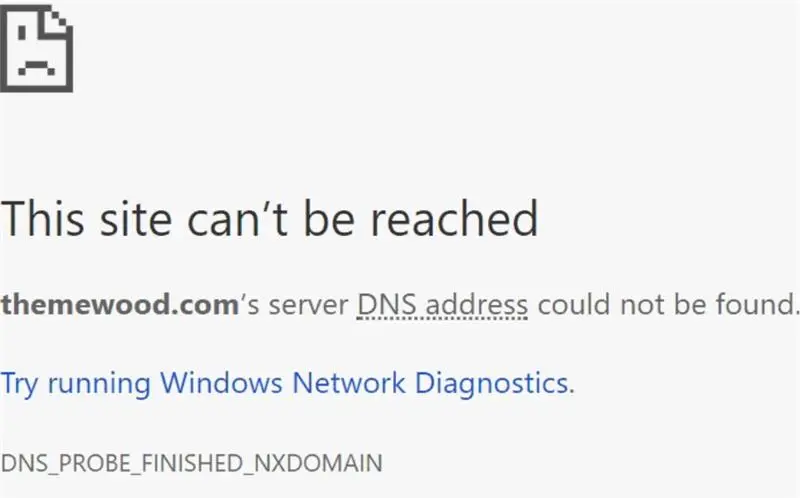
The DNS_PROBE_FINISHED_NXDOMAIN error indicates that your browser cannot resolve a domain name into an IP address. In simple terms, Chrome asked the Domain Name System (DNS) for the location of a website, but the DNS response said the domain does not exist. However, this doesn’t necessarily mean that the website has disappeared. Usually, it indicates that there are some configuration issues with respect to DNS on your device, browser, or network.
Let’s understand this with a simple breakdown:
DNS:The distributed database that maps the domain names to the IP address.
Probe: It is the action of asking the DNS to locate the server’s IP.
Finished: It indicates that the process is completed.
NXDOMAIN: It stands for “non-existent domain”. This means that the domain does not exist, or it is not possible to resolve it.
How DNS Works

To make sense of how and why this error occurs, it is important to understand how DNS works. So, what is DNS (Domain Name System)? The Domain Name System (DNS) is a global directory that translates domain names into IP addresses. When you enter a website URL into Chrome:
- The browser sends a DNS query to resolve the domain name
- DNS servers look up the corresponding IP address for that domain
- The browser connects to that IP address
- When the connection is made, the website loads in your browser
If at any stage DNS lookup fails, Chrome won’t be able to continue the process and display NXDOMAIN error. This breakdown can occur at multiple levels, such as at the device level, network level, or DNS server level.
Common Causes of DNS_PROBE_FINISHED_NXDOMAIN

There are several causes of this error. The error does not just have one specific problem it can stem from multiple sources.
How DNS_PROBE_FINISHED_NXDOMAIN Affects Your Website and Visitors
The DNS_PROBE_FINISHED_NXDOMAIN error doesn’t just stop users from accessing a website—it can also damage the overall browsing experience and reduce visitor confidence. When a domain name can’t be resolved, users are likely to assume the website is unavailable or no longer exists. In many cases, they’ll leave immediately and search for an alternative, especially if they’re trying to make a purchase or find important information.
For website owners, repeated DNS issues can lead to lost traffic, lower engagement, and missed business opportunities. If search engine crawlers frequently encounter DNS resolution problems, important pages may not be crawled or indexed efficiently, which can affect your site’s visibility over time. Since several browser and network issues can display similar symptoms, it’s also worth understanding the differences between DNS problems and the ERR_CONNECTION_RESET Error to ensure you’re applying the correct troubleshooting steps instead of fixing the wrong issue.
Incorrect or Misspelled URLs
If you make even a simple spelling mistake in your URL such as missing a letter or typing wrong domain extension, it can cause DNS to fail as DNS is very specific, and it cannot just guess the correct website.
Corrupted DNS Cache
To speed up your browsing experience, your system stores DNS data locally. But if cache gets outdated or becomes corrupted, Chrome may display incorrect DNS information which can be a cause of NXDOMAIN errors. Similar cache-related issues like err_cache_miss can also prevent websites from loading properly.
Network or ISP DNS Issues
The requirements for a successful request to complete a DNS lookup are the same for any request that is made over the Internet. However, problems such as temporary network problems or interruptions, unstable Wi-Fi connections or ISP-level DNS failures can prevent proper domain resolution.
VPN, Proxy, or Firewall Issues
Using VPN and proxy services often reroute DNS requests. If you configure incorrectly, they may misdirect or block DNS queries. Similarly, firewalls may restrict DNS traffic unintentionally.
Domain or Hosting Problems
In some cases, the website itself has few issues such as expired domain registration or broken DNS records.
How to Fix DNS_PROBE_FINISHED_NXDOMAIN in Chrome
Now that we know how the error occurs, let’s dive into the ways to fix it. Below are detailed and proven solutions that are arranged from easiest to more advanced level:
1. Check the Website URL
Before making adjustments to any settings, make sure you:
- Double-check all spellings carefully along with the domain extension
- Remove any extra characters like “www” if they are not necessary
- Attempt to open the website on another device or network
Even after this, if the site still fails everywhere then the issue is likely not on your end.
2. Restart Internet Connection
It is recommended that you restart your modem and router. Doing this temporarily clears network errors and refreshes DNS assignments.
- Power off modem and router
- Wait 30 seconds
- Turn them back on and try to reconnect
Usually, this resolves short-term DNS communication failures.
3. Flush DNS Cache
Flush all DNS cache. It removes outdated or incorrect DNS records that are stored locally.
On Windows: Flushing DNS on windows forces the system to fetch fresh DNS data from servers rather than relying on cached entries.
On macOS: For macOS users,clearing cache resets DNS resolution at the system level, which is quite helpful when domains fail to resolve inconsistently.
This step alone fixes many NXDOMAIN errors.
4. Change DNS Servers
One solution is to change your DNS server. It is believed that public DNS providers are often faster and more reliable than ISP defaults. Why is it important to switch DNS servers? Because it ensures that stable and globally distributed systems handle your requests.
- Google DNS focuses on reliability
- Cloudflare DNS emphasizes speed and privacy
5. Disable VPN or Proxy Temporarily
You can also disable VPN, or proxy temporarily as VPNs can override system DNS settings and route requests through distant servers. If the site loads successfully, adjust VPN DNS settings or select a different server.
- Disable VPN
- Turn off proxy settings
- Now reload the webpage
6. Change Chrome DNS Settings
Sometimes, Chrome uses its own DNS resolver rather than relying on the system DNS. When you disable secure DNS, it forces Chrome to rely on operating system DNS settings which is capable of resolving conflicts between browser-level and network-level DNS handling.
7. Restart DNS Client Service
The DNS client service manages DNS caching and queries. Restarting it clears internal errors and refreshes communication with DNS servers. It is especially helpful after network changes.
8. Check Firewall and Security Software
Some security tools mistakenly block DNS requests as suspicious activity. In such situations:
- Temporarily disable third-party antivirus or firewall
- Test the website again
- Add DNS traffic exceptions if needed
Instead of keeping security disabled permanently adjust rules instead.
DNS_PROBE_FINISHED_NXDOMAIN Chrome and SEO Impact
The dns_probe_finished_nxdomain chrome error ca severely affect a website’s search visibility if occur frequently or remain unresolved for long periods. DNS-related failures can directly affect how your site is discovered, evaluated, and ranked.
DNS Errors Prevent Search Engine Crawling
When Googlebot or other crawlers encounter DNS resolution failures, they cannot reach your server at all. This means pages are skipped during crawl cycles content updates are not detected, and new URLs remain undiscovered. Repeated DNS failures can cause search engines to reduce crawl frequency, slowing down overall indexation.
DNS Errors Prevent Search Engine Crawling
To maintain the health of technical websites, DNS reliability plays an important role. Frequent occurrence of NXDOMAIN responses can trigger uptime alerts, error logs, and performance warnings in SEO tools. The instability of DNS works directly against SEO as search engines favor consistent and stable accessible domains.
Risk of De-Indexing from Google
If DNS_PROBE_FINISHED_NXDOMAIN errors persist, search engines may interpret the domain as unavailable or permanently removed. Over time, this can lead to affected URLs being dropped from the index. In severe cases, entire sections of the site or the whole domain can disappear from search results until DNS stability is restored.
Loss of Backlink Value and Referral Traffic
Backlinks only pass value when the destination site is accessible. DNS errors temporarily Continued DNS instability may even lead other websites to remove or replace links, resulting in permanent SEO losses.
How Website Owners Can Prevent Dns_Probe_Finished_Nxdomain Chrome

Proactive DNS management and disciplined technical practices can prevent the dns_probe_finished_nxdomain error. Website owners can protect user experience along with search engine visibility by maintaining a stable DNS environment.
Renew Domain Before Expiry
A domain that has expired instantly displays NXDOMAIN responses because DNS records are removed. To avoid this, website owners should enable auto-renewal, maintain updated payment details, and set reminders manually well in advance to ensure that the domain never lapses, even temporarily.
Use Reliable DNS Providers
DNS providers that are overloaded and low-quality are more vulnerable to resolution failures. Choosing a DNS service with high uptime, global infrastructure, and fast response times significantly reduces the likelihood of Chrome DNS errors and improves overall site reliability.
Audit DNS Records Regularly
DNS records should be reviewed periodically to confirm that CNAME records and nameserver configurations are correct. Even minor misconfigurations or outdated records can prevent proper domain resolution and trigger NXDOMAIN errors across browsers.
Monitor DNS Performance
DNS monitoring tools detect failures before they can impact users or search engines. With continuous monitoring, website owners can respond quickly to resolution issues which minimize downtime and prevent SEO damage caused by unavailability of DNS.
Use Backup Nameservers
Using multiple nameservers ensures redundancy.In case one DNS server fails,others can still continue to resolve the domain which helps in preventing NXDOMAIN errors and maintains uninterrupted access for both users and crawlers.
Avoid DNS Errors During Migrations
Domain migrations are high-risk moments for DNS errors. Proper planning, overlapping DNS configurations, and post-migration testing are essential factors to ensure that the domain continues to resolve correctly throughout the transition period.
How to Verify That the DNS_PROBE_FINISHED_NXDOMAIN Error Is Completely Fixed
Fixing the DNS_PROBE_FINISHED_NXDOMAIN error is only the first step. Before assuming the issue has been resolved, it’s important to confirm that your website is accessible across different networks and devices. Sometimes, DNS changes take time to propagate, and cached DNS records can make it appear that the problem still exists even after the correct settings have been applied.
Start by opening your website in an incognito window or a different browser to rule out browser cache issues. Next, test the domain using another internet connection, such as mobile data, to verify whether the problem is limited to a specific network. You should also use online DNS lookup tools to confirm that your domain is resolving to the correct IP address worldwide.
If your website runs on WordPress, don’t overlook the importance of routine maintenance after resolving DNS issues. Tasks such as Database Optimization help improve your site’s overall health and make it easier to troubleshoot future performance or connectivity problems. Finally, monitor your website for the next 24–48 hours to ensure the error doesn’t reappear after DNS propagation is complete.
Conclusion
The DNS_PROBE_FINISHED_NXDOMAIN chrome is a technical error which is rooted in DNS resolution. However, its impact extends far beyond a simple browser message. When it is left unresolved for a long time, it can disrupt access of the user, weaken search engine visibility, and gradually diminish trust in a website. To ensure long-term SEO stability and consistent accessibility, it is essential to understand the causes, methods of fixing the error, and maintain strong DNS practices.
For website owners, proactive DNS management is no longer an option; it has become a necessary foundation for technical SEO and improving user experience. A stable DNS setup is the one that ensures that both search engines and users can find your website and interact with it reliably.
FAQs
What does DNS_PROBE_FINISHED_NXDOMAIN Chrome mean?
It means Chrome could not resolve the domain name because the DNS system reported that the domain does not exist or cannot be found. This is usually caused by DNS, network, or configuration issues rather than the browser itself.
Is DNS_PROBE_FINISHED_NXDOMAIN a permanent error?
No, in most cases it is temporary. The error often disappears once DNS cache is cleared DNS servers are changed, or network settings are corrected.
Can DNS_PROBE_FINISHED_NXDOMAIN Chrome affect SEO rankings?
Yes, if it occurs frequently. Persistent DNS errors can prevent search engines from crawling your site, leading to indexing issues and potential ranking drops.
Does changing DNS servers fix DNS_PROBE_FINISHED_NXDOMAIN Chrome?
In many cases, yes. Switching to reliable public DNS providers like Google DNS or Cloudflare can immediately resolve domain lookup failures.
Can an expired domain cause DNS_PROBE_FINISHED_NXDOMAIN Chrome?
Yes, an expired or unrenewed domain returns NXDOMAIN responses because its DNS records are removed, making the website inaccessible to browsers and search engines.