


 Share on media
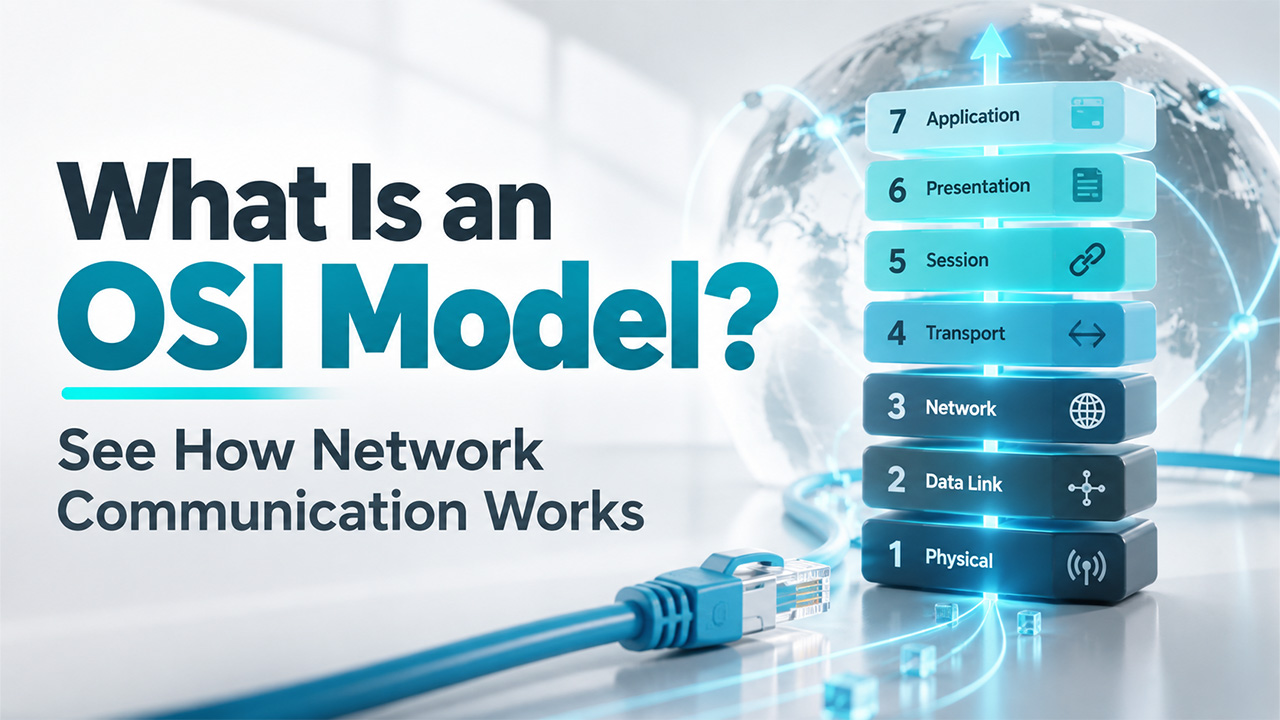


Every video call, email, and web page relies on data going from one device to another that typically runs distinct software and hardware. Networking professionals explain this movement using shared references, also known as the OSI model. Anyone who queries “what is an OSI model” is basically asking how such distinct platforms reliably handle communication. In this detailed guide, let us study what is the purpose of the framework, the seven layers it describes, and the way data goes through them, and its continuing value for network security and troubleshooting.
What Is an OSI Model?
The Open Systems Interconnection Model, commonly known as the OSI model, refers to a conceptual framework built by the ISO, which stands for International Organization for Standardization. It segments network communication into seven abstract layers, each with a definite role. This provides distinct computer systems with a common structure for data exchange through agreed protocols.
In the late 70s, manufacturers of computers created proprietary networking solutions that could not operate together and typically tied businesses to a single vendor. ISO published this model in 1984 to address such incompatibilities and provide engineers with a standard approach to developing interoperable software and hardware.
Important features are as follows:
- Divides network communication into seven different layers with particular responsibilities.
- Allows every layer to interact with the layers above and below it directly.
- Enhances compatibility between platforms from distinct vendors.
- Streamlines implementation, network design, and troubleshooting.
The Seven Layers in OSI Model, From Top to Bottom

There are seven layer numbers, in ascending order from the bottom, which means 1 is at the bottom and 7 is at the top, and Layer 7 is closest to the user:
- Layer 7, Application: Gives the protocols that software like email clients and web browsers ultimately depends on. Examples are HTTPs, HTTP, DNS, and SMTP. For instance, websites created with WordPress reach visitors through HTTP or HTTPS. The applications themselves are not part of this layer.
- Layer 6, Presentation: Creates data so that the receiving application can understand it. It manages translation between encryption, formats, and compression.
- Layer 5, Session: Opens, closes, and maintains communication sessions between different devices. It also establishes checkpoints, so an interrupted transfer can restart from the last checkpoint instead of beginning again.
- Layer 4, Transport: Handles end-to-end delivery. It groups data into segments, applies error and flow control, and leverages port numbers to reach the right application. TCP provides reliable delivery via a handshake, while UDP provides quicker transmission without a guarantee of delivery.
- Layer 3, Network: Manages logical addressing with routing and IP addresses between distinct networks. Data at this layer is then packaged as packets, and routers work here.
- Layer 2, Data Link: Ensures data between the same network and devices. It packages pockets into different frames, leverages MAC addresses, and involves two sublayers, Media Access Layer (MAC) and Logical Link Layer (LLC). Switches work here.
- Layer 1, Physical: Covers connectors, cables, and signals. It transmits raw bits as light pulses, electrical signals, or radio waves.
DNS needs special mention since website owners directly work with it. It translates domain names into IP address, and it becomes important when you connect a domain to a WordPress website through A records and nameservers.
How Data Moves Through the Layers?
When a device sends you data, the data goes down through all of the seven layers on the sending device as well as on the receiving device. Every layer has its own data, often header, as the data goes. This process is known as encapsulation. The receiving device eliminates the data in reverse order.
The name of the data also changes as it moves through different layers: packets at Layer 3, segments at Layer 4, frames at Layer 2, and bits at Layer 1.
An email message indicates how this operates in practice:
- Application: The email client sends the message to a protocol known as SMTP.
- Presentation: The data is encrypted and compressed for secure transmission.
- Session: A communication session is set up between the mail server and sender.
- Transport: The message is grouped into segments with sequence numbers for a dependable delivery.
- Network: Packets are routed across networks, and IP addresses are added.
- Data Link: Packets emerge as frames with error detection and MAC addresses.
- Physical: Frames are transformed into bits and sent through a wireless medium or cable.
On the side of destination, the process is reversed until the message is received in the recipient’s inbox.
Presentation layer encryption secures data in transmit. Website owners depend on the same level of security when they install an SSL certificate. You can learn more in detail through our guide on how to secure a WordPress site.
Why Is the OSI Model Important?

The modern internet does not follow the seven-layer design strictly. It follows the Internet protocol suite strictly, known as TCP/IP, which is more straightforward and commonly presented with four different layers:
- Network Access: Covers OSI Layers 1 and 2
- Internet: Maps to Layer 3 and utilizes IP.
- Transport: Maps to Layer 4 and utilizes UDP and TCP.
- Application: Combines OSI Layers 5, 6, and 7
This architecture with seven different layers is important for various reasons:
- Troubleshooting: You can narrow down a problem to a single layer, which prevents unnecessary work. Physical checks, like link lights, cables, and power, are a great starting point.
- Shared Vocabulary: Engineers leverage terms such as Layer 3 routing, Layer 2 switch, and Layer 7 protocol, and everyone knows which part of the stack is involved.
- Modular Development: Protocols for a single layer can be built without modifying the others.
- Security Planning: You can map the threats to different layers. SQL injection at Layer 7, Firewalls at Layer 3,4, and 7, and an ARP spoofing attack at Layer 2.
Read More: Layered thinking is also applied to websites as well. WP-1Click provides security and performance optimization services for WordPress websites, considering performance and security as an in-built feature instead of being added later on.
Conclusion
So, what is an OSI model in simple terms? It is a conceptual framework that divides network communication into seven layers, starting with physical cabling at Layer 1 and moving up to application protocols at Layer 7. Although the modern internet primarily relies on the TCP/IP model, the OSI model remains a valuable reference for students, engineers, developers, and website owners. It provides a shared language for troubleshooting faults, understanding security issues, improving Network Optimization, and explaining how data travels between connected devices.
Understanding these layers can make complex networking concepts easier to break down and can help identify where a connection problem may occur. Whether you are learning networking fundamentals or managing a website, the OSI model offers a practical way to understand how different technologies work together to deliver reliable communication.
Frequently Asked Questions
Who generated the OSI model?
The International Organization for Standardization (ISO) built the OSI model and published it way back in the 80s to standardize how distinct platforms interact.
How many layers can the OSI model have?
An OSI model has around seven layers, which includes: Physical, Network, Data Link, Session, Transport, Presentation and Application.
Do we use the OSI model on the internet today?
Not really. The modern internet implements a straightforward TCP/IP suite. However, the seven-layer design is still broadly utilized for teaching, troubleshooting, and security planning.
What is the main difference between the TCP/IP model and the OSI model?
The OSI model is basically a theoretical framework with around seven layers. On the other hand, TCP/IP is a protocol-based and practical model presented with four layers commonly.
What do we mean by encapsulation in the OSI layers?
Encapsulation is an overall process where every layer adds its own data, often a header, as data goes down the stack. The receiving device eliminates the data in reverse order.
