Share on media



If your website feels sluggish even after optimizing images, minifying code, and upgrading hosting, the problem might not be where you think it is. One of the most overlooked causes of a slow-loading site is slow DNS lookup, and it can quietly add hundreds of milliseconds to every single page load without showing up in the obvious places.
For every page view on your site, browsers have to convert your domain name to its IP address before starting to load any part of your site. The process itself takes time, and the longer it takes, the more users will be idle, which negatively affects your bounce rate and site performance.
This article describes how to resolve this issue of slow DNS lookup, how it can happen, and, finally, gives you 9 proven ways to fix it.
What Is DNS and How Does It Work?
Domain Name System (DNS) means exactly what you think: it is the address book of the Internet. Every time an end-user enters the domain name in a web browser to visit a website, it is the DNS protocol that will turn this readable domain name into the IP address of the server where the particular website is hosted. Otherwise, end-users would need to remember the IP addresses of each website they visit online.
The following is a basic explanation of the process:
- An end-user enters a domain name: The browser checks whether there is a local cache for that particular IP address.
- Recursive resolver: If there is no local cache, then the request is sent to a recursive resolver, usually provided by the user’s ISP.
- Root nameserver: The next step is to ask a root nameserver that will direct the user’s browser to the appropriate TLD.
- Authoritative nameserver: The final step, where the actual IP address for the domain is retrieved and returned to the browser.
- Browser connecting: Now that the browser knows the IP address, it can start loading the website.
The entire process takes place within a fraction of a second, but whenever there is some delay in one of these steps because of something like an overloaded resolver, remote nameserver, or poorly configured DNS infrastructure, then we have a slow DNS lookup, which will slow down everything else that follows.
What Causes Slow DNS Lookup?
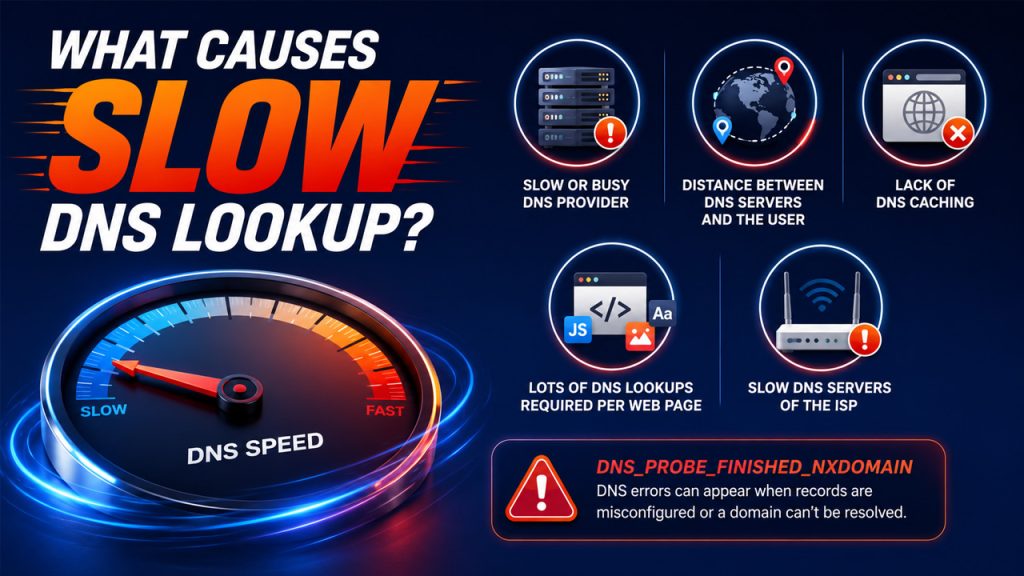
It is essential to know why the problem occurs before fixing it. There are multiple reasons for the slow DNS lookup, which makes it easy to apply the most appropriate remedy.
- Slow or busy DNS provider: If your DNS provider has servers that have problems with response speed or handle lots of traffic, all DNS lookups will take extra time.
- Distance between DNS servers and the user: The further the DNS server is located from the user, the longer it will take to receive the information back.
- Lack of DNS caching: Without caching, the browser performs a full DNS lookup every time a user visits, instead of reusing a stored result.
- Lots of DNS lookups required per web page: Each external script, font, advertisement, or tracking service requires its own DNS lookup.
- Slow DNS servers of the ISP: By default, internet service providers give access to DNS servers that are slower than other third-party ones.
DNS errors like DNS_PROBE_FINISHED_NXDOMAIN are also commonly linked to these underlying issues, often appearing when DNS records are misconfigured or a domain simply can’t be resolved at all.
How to Fix Slow DNS Lookup: 9 Proven Ways
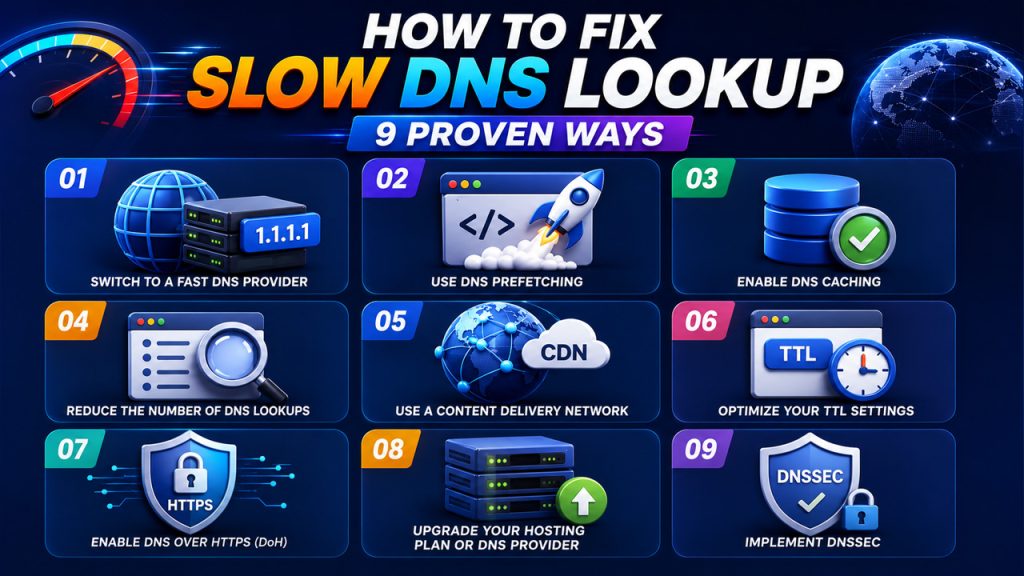
If you’ve confirmed that slow DNS lookup is dragging down your website speed, here are 9 proven ways to fix it, starting with one of the most impactful changes you can make.
1. Switch to a Fast DNS Provider
There are many ways to try and find out how to resolve slow DNS lookup issues, but one of the easiest and fastest would be using a fast DNS service. Your ISP assigns you a default DNS, which may not be as fast and optimized as some other third-party DNS services.
- Google Public DNS (8.8.8.8): One of the fastest and most popular public DNS servers in the world.
- Cloudflare DNS (1.1.1.1): Great reputation for speed and privacy.
- OpenDNS: Another good choice with speed and security features.
Changing the DNS is an easy task that only takes several minutes and significantly speeds up the lookup process.
2. Use DNS Prefetching
DNS prefetching is a simple but effective technique that tells the browser to resolve domain names in the background before a user actually clicks a link or loads a resource.
- Add prefetch hints to your HTML: Use <link rel=”dns-prefetch” href=”//example.com”> in your page’s <head> section for any third-party domains your page loads from
- Prioritize high-impact domains: Focus prefetching on domains used for fonts, scripts, analytics, and ad networks since these trigger the most DNS lookups.
- Enable it in WordPress: Many website speed optimization plugins support DNS prefetching with a simple toggle, making it easy to implement without touching code.
By resolving DNS in the background before it’s needed, prefetching removes lookup delays from the critical path of your page load entirely.
3. Enable DNS Caching
DNS caching allows your browser, operating system, and DNS resolver to store the IP addresses of websites for a set period of time. This means that the next time someone visits the same website, the DNS lookup is already done, and the browser can skip straight to loading the page instead of going through the full resolution process all over again.
- Browser caching: Modern browsers cache DNS results automatically, but make sure your browser settings aren’t set to clear the cache too aggressively, which would force fresh lookups more often than necessary.
- Server-side caching: If you run a website, configure your server to cache DNS queries so it isn’t performing fresh lookups for the same domains repeatedly across multiple requests.
- Operating system cache: On servers and local machines, enabling OS-level DNS caching speeds up lookups for frequently accessed domains by storing results at the system level rather than relying on external resolvers every time.
By keeping DNS results cached at multiple levels, you significantly reduce the number of full lookups needed and keep your website speed optimization efforts working in the right direction.
4. Reduce the Number of DNS Lookups
Every third-party resource your page loads, whether it’s a font, an ad network, or a social media widget, triggers its own DNS lookup. These individual lookups might seem small on their own, but they stack up quickly and can add significant delays to your overall page load time.
- Audit your third-party scripts: Use a tool like Google PageSpeed Insights or GTmetrix to see exactly how many external domains your page is connecting to and identify the ones that aren’t worth the extra lookup.
- Host resources locally where possible: Instead of loading fonts or scripts from external CDNs, consider hosting commonly used files directly on your own server to eliminate the DNS lookup entirely.
- Combine or replace scripts: If multiple tools are doing similar jobs, consolidating them into fewer solutions reduces the number of domains your page needs to connect to.
Cutting down on unnecessary DNS lookups is one of the most direct ways to address DNS lookup issues and improve how quickly your page starts rendering for visitors.
5. Use a Content Delivery Network (CDN)
A CDN is a network of servers distributed across different geographic locations designed to serve your website’s content from whichever server is closest to the visitors. Beyond just speeding up content delivery, a good CDN also helps reduce slow DNS lookup times by handling DNS resolution closer to where your visitors actually are.
- Choose a CDN with built-in DNS: Many CDN providers like Cloudflare, Fastly, and AWS CloudFront come with their own DNS infrastructure, reducing the number of hops needed to resolve your domain.
- Enable Anycast routing: Most major CDNs use Anycast, which automatically routes DNS queries to the nearest available server, cutting down on the geographical distance that adds latency to lookups.
- Offload third-party resources through the CDN: Routing external scripts and assets through your CDN reduces the number of separate DNS lookups triggered by third-party domains.
A CDN doesn’t just make your content load faster; it makes the entire DNS resolution process faster too, which pays off for every single visitor regardless of where they’re browsing from.
6. Optimize Your TTL Settings
TTL, or Time-to-Live, controls how long DNS resolvers cache a response before fetching a fresh one. Getting this right is one of the more overlooked ways to fix slow DNS lookup, but it directly affects how quickly your domain resolves for repeat visitors.
- Avoid setting TTL too low: Values like 60 seconds force constant fresh lookups, increasing DNS query load and adding unnecessary latency.
- Avoid setting TTL too high: Excessively high TTL means DNS changes take much longer to propagate across the internet.
- Check current TTL settings: Tools like DNSChecker or MXToolbox help you review existing values and spot anything set too aggressively.
Finding the right TTL balance keeps DNS records cached long enough to speed things up, without causing stale record issues that affect how your site resolves for different visitors.
7. Enable DNS over HTTPS (DoH)
DNS over HTTPS is a protocol that encrypts DNS queries by sending them through HTTPS connections instead of plain, unencrypted requests. Beyond the privacy and security benefits, DoH can also help reduce DNS lookup issues by routing queries through faster, more reliable encrypted resolvers rather than the default ones assigned by your ISP.
- Enable DoH in your browser: Most modern browsers like Chrome, Firefox, and Edge have built-in DNS over HTTPS settings that can be turned on in just a few clicks under privacy or security settings.
- Choose a fast DoH provider: Cloudflare (1.1.1.1) and Google (8.8.8.8) both offer DoH support and are among the fastest resolvers available.
- Enable DoH at the operating system level: Windows 11 and recent versions of macOS support system-wide DoH, which applies the benefits across all apps and browsers, not just one.
Enabling DNS over HTTPS adds a layer of security while also giving your DNS queries a faster, more reliable path, making it a worthwhile fix for both website speed optimization and overall browsing safety.
8. Upgrade Your Hosting Plan or DNS Provider
Sometimes the root cause of slow DNS lookup isn’t a configuration issue at all; it’s simply that your current hosting plan or DNS provider isn’t fast enough to keep up. Budget hosting plans often come with shared, slower DNS infrastructure that becomes a bottleneck as your site grows.
- Benchmark your current provider: use tools like DNSPerf or SolveDNS to see how your DNS provider stacks up against alternatives in terms of global response time before making any decisions.
- Switch to a dedicated DNS service: Moving to a provider like Cloudflare, AWS Route 53, or NS1 gives you significantly faster resolution times than what most standard hosting plans include by default.
- Look for Anycast DNS support: Make sure your new provider uses Anycast routing, which automatically directs queries to the nearest available server and reduces the geographic latency behind most DNS lookup issues.
Upgrading your DNS infrastructure is one of those fixes that pays off consistently over time, since faster resolution benefits every single visitor who lands on your site, not just a portion of them.
9. Implement DNSSEC
DNSSEC, or Domain Name System Security Extensions, is a security protocol that adds a layer of verification to the DNS lookup process, ensuring that the responses your visitors receive haven’t been tampered with or redirected maliciously.
- Enable DNSSEC through your domain registrar: Most major registrars like GoDaddy, Namecheap, and Google Domains offer DNSSEC as a one-click option in your domain settings.
- Verify your DNSSEC configuration: Use tools like Verisign’s DNSSEC Analyzer or DNSViz to confirm your setup is working correctly and not introducing any resolution delays.
- Make sure your DNS provider supports it: Not all DNS providers fully support DNSSEC, so confirm compatibility before enabling it to avoid misconfiguration issues that could slow things down further.
A correctly configured DNSSEC setup protects your visitors from DNS-based attacks while keeping the resolution process running smoothly, making it a worthwhile addition to any serious website speed optimization strategy.
Quick Overview: Common DNS Issues and Fixes
This table gives you a quick at-a-glance view of the most common causes behind slow DNS lookup and the corresponding fix for each.
| Cause | Fix |
| Slow or overloaded DNS provider | Switch to a faster DNS provider (Cloudflare, Google DNS) |
| Too many third-party DNS lookups | Reduce DNS lookups and use DNS prefetching |
| DNS responses not being cached | Enable DNS caching at browser, server, and OS level |
| TTL values set too low or too high | Optimize TTL settings to around 3600 seconds |
| Geographic distance to DNS servers | Use a CDN with built-in DNS and Anycast routing |
| Unencrypted DNS queries are slowing resolution | Enable DNS over HTTPS (DoH) |
| Budget hosting with slow DNS infrastructure | Upgrade hosting plan or switch to a dedicated DNS provider |
| DNS records vulnerable to tampering | Implement DNSSEC for secure, reliable resolution |
How to Monitor DNS Performance
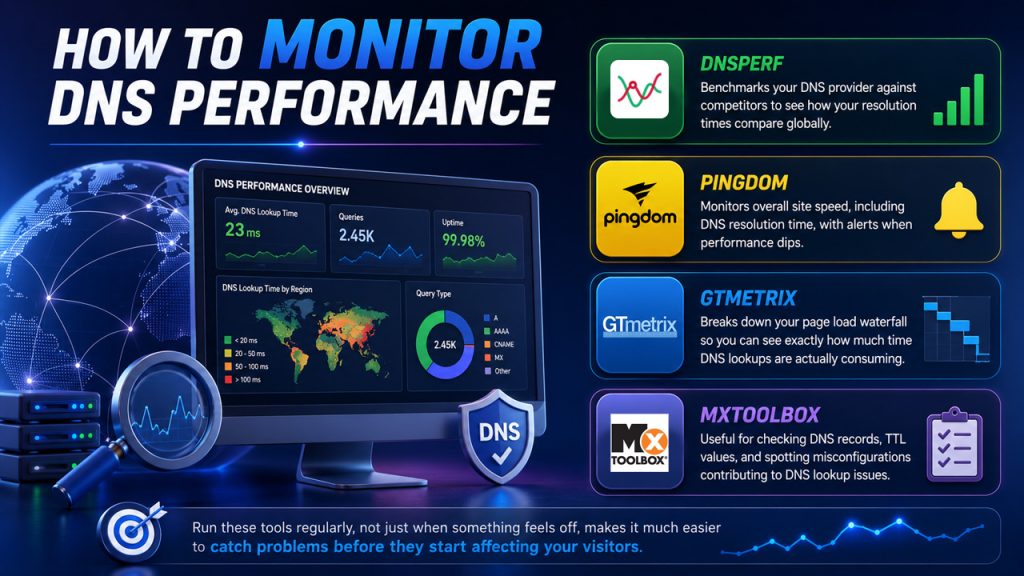
Fixing slow DNS lookup is only half the job; keeping an eye on performance over time ensures issues don’t creep back in unnoticed.
Here are a few reliable tools worth bookmarking:
- DNSPerf: Benchmarks your DNS provider against competitors to see how your resolution times compare globally.
- Pingdom: Monitors overall site speed, including DNS resolution time, with alerts when performance dips.
- GTmetrix: Breaks down your page load waterfall so you can see exactly how much time DNS lookups are actually consuming.
- MXToolbox: Useful for checking DNS records, TTL values, and spotting misconfigurations contributing to DNS lookup issues.
Running these tools regularly, not just when something feels off, makes it much easier to catch problems before they start affecting your visitors.
Conclusion
Slow DNS lookup is one of those performance issues that’s easy to overlook but hard to ignore once you realize how much it’s affecting your site. Every millisecond added to the DNS resolution process is a millisecond your visitors spend waiting before your page even begins to load.
The good news is that most DNS lookup issues are fixable without a complete infrastructure overhaul. Whether it’s switching to a faster DNS provider, enabling caching, using a CDN, or fine-tuning your TTL settings, each fix we’ve covered contributes to a faster, more reliable experience for everyone who visits your site.
The key is to treat website speed optimization as an ongoing effort rather than a one-time fix. Along with improving DNS performance, understanding what is a runtime environment and ensuring your server is properly configured can further enhance your website’s speed, stability, and overall user experience. DNS performance can change over time as your traffic grows, third-party services change, or your hosting setup evolves. Keeping an eye on it regularly with the right monitoring tools ensures the improvements you make today continue to hold up tomorrow.