Share on media


It might seem complicated when you first get started with WordPress, but once you realize their capabilities, plugins become one of the most valuable features of WordPress websites. To put it simply, plugins are extensions which help improve and extend the capabilities of your site all without touching a single line of code.
Regardless of whether you wish to optimize your website’s SEO performance, add contact forms to it, increase its loading speed, or create an online store, chances are good that there exists a plugin designed especially for that purpose.
This article is going to show you all the basics of using WordPress plugins and what you need to know about them.
What are WordPress Plugins?
Consider WordPress plugins as applications for your website — similar to how you install various applications on your mobile phone for added functions, plugins enable you to enhance your WordPress website without writing any line of code.
This phrase seems pretty common among the WordPress community: “There’s a plugin for that.” And indeed, it’s accurate. Whatever functionality you are searching for, there’s a very high probability that someone has developed a plugin for it.
The design philosophy of WordPress is such that anyone interested could get in and develop using it. By utilizing the WordPress plugin API, which is basically made up of hooks and filters, developers can even alter the existing functionalities of WordPress or even introduce entirely new ones.
How To Install a WordPress Plugin?
Installing a Plugin on WordPress is simpler than you might think. Here is how to do it step by step:
- Go to Plugins>> Add New in your WordPress admin sidebar. This opens the plugin repository where you can browse or search for any plugin you need.
- Click install now once you find the right plugin. It only takes a few seconds to complete.
- Hit activate after the installation finishes. Your plugin in now live and ready to you.
- Configure the settings if needed. Most plugins add a settings page where you can customize how they work on your site.
- Deactivate or delete plugins you no longer need. As your site grows unused plugins tend to pile up and keeping them around can quietly slow your site down.
- Uninstall properly rather than just deactivating — the same applies to unused themes, and using a WordPress plugin to clean up old themes keeps your site lean and running smoothly.”
How to Update WordPress Plugins?
Keeping your plugins updated is one of the simplest things you can do to keep your site secure and running smoothly. Here is what you need to know:
- Watch for update notifications in your admin toolbar and sidebar. Whenever a developer releases a new version, WordPress will let you know automatically.
- Click on the notification and it will take you straight to the updates page, where you will also see any pending WordPress core or theme updates all in one place.
- Update regularly and don’t let notifications pile up. Outdated plugins are one of the most common reasons WordPress sites get hacked or start breaking.
- Enable automatic updates for plugins you trust or rely on daily. This way minor updates happen in the background without you having to think about it.
- Keep an eye on automatic updates even when they are turned on. It is still good practice to occasionally check that everything updated smoothly and nothing on your site broke in the process.
How to Create a WordPress Plugin?
- Learn PHP basics first. WordPress runs on PHP, so a foundational understanding is essential before you write a single line of plugin code.
- Set up a local environment. Build and test everything on your computer first — never experiment directly on a live website.
- Start with something simple. Your first plugin doesn’t need to be complex. A small, single-function plugin is the best way to learn how things work.
- Test before going live. Make sure your plugin works well with WordPress and doesn’t conflict with other plugins or themes before deploying it.
- Share it with the community. Once it’s ready, submit it to the WordPress Plugin Directory so others can discover and use what you built.
How to Choose the Right Plugin?
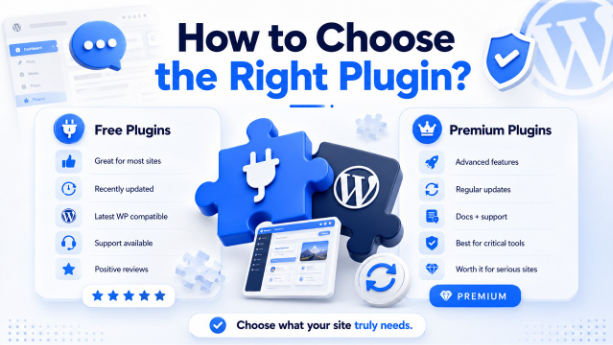
There is no shortage of Plugins on the market, making choosing the best option a difficult task. And what if multiple plugins have almost identical functionality? Here are some things you should consider before purchasing:
Free Plugins
They will be sufficient for the majority of sites as they can fulfil most of their requirements and give excellent results for no money at all.
However, not all free plugins are created equal. When downloading a plugin, make sure that:
- It has been recently updated.
- It is compatible with the latest versions of WordPress.
- There is someone from the developer’s team available to answer support questions.
- Other user’s experiences and opinions about the plugin are positive.
- As your site evolves, you will need to replace some of the plugins with their paid counterparts.
Premium Plugins
These are paid plugins with extended functionality, support service documentation, and regular updates. Their purchase is recommended if you are ready to take your site seriously.
Generally, it is safe to say that if the plugin plays an important role in your site operation, and its malfunction will affect your activity, negatively, you better buy its premium version.
What are the best WordPress plugins?
This is honestly one of the most common questions beginners ask, and it makes sense because with thousands of options out there, knowing where to start is half the battle.
The truth is, there is no single best plugin for everyone. It all comes down to what your website needs. An ecommerce store will need completely different plugins compared to a personal blog or a business portfolio site.
That said, there are a few categories where almost every WordPress site will need a reliable plugin at some point:
- SEO — to help your site rank on Google.
- Security — to protect your site from threats.
- Speed and Performance — to make sure your site loads fast.
- Backups — so you never lose your content.
- Contact Forms — to make it easy for visitors to reach you.
- eCommerce — if you plan to sell anything online.
The best approach is to identify what your site actually needs right now, research the top options in that category, check the reviews and update history, and start with one plugin at a time rather than installing everything at once.
As your site grows your plugin stack will naturally evolve — and that is completely normal.
Conclusion
WordPress plugins are what make WordPress truly powerful, and once you get the hang of them, they become one of the most valuable parts of managing your site. The key is to keep things simple: install only what you actually need, stay on top of updates, and remove anything you are no longer using.
As your site grows, your plugin needs will naturally evolve too — and that is completely fine. Start lean, choose wisely, and you will have a fast, functional website that does exactly what you need it to do.