
 Continue with Google

 Share on media
Picture this: you open your laptop, pull up your website the way you do every morning, half out of habit, half out of anxiety, and something is wrong. Your homepage looks naked, beautiful full-screen slider that you spent hours configuring, the one with the animated text, and the perfectly timed transition is just gone. You didn’t touch anything or change anything but somewhere in the background, WordPress updated itself to version 6.9, and the Slider Revolution didn’t survive this change.
If you’re reading this after it happened to you, then you’re in good company. WordPress powers an enormous slice of the internet, and if you’ve ever gone through the process of building a WordPress website from scratch, you already know how much effort goes into getting every element to look and behave exactly right which makes a sudden, unexplained breakage all the more frustrating. This guide explores what broke, the reasons behind it, and practical ways to keep your live site safe and running.
What Changed in WordPress 6.9 That Broke Slider Revolution
WordPress 6.9 dropped on 2 December 2025 and by lunchtime the same day, several major plugins were already showing cracks. This update wasn’t reckless, it brought real performance gain, roughly 15-20% faster page loads, full PHP 8.5 compatibility, and meaningful improvements to the block editor, making it a good progress. However, two architectural changes created chaos for plugins that weren’t ready.
The first change was the Abilities API, a new and unified system for handling user permissions. WordPress essentially retired parts of old permission-checking logic and replaced it with something cleaner. Any plugin that had been quietly relying on the old patterns, instead of official WordPress APIs got blindsided.
The second was changes to the Interactivity API, which governs how blocks communicate dynamically on the front end. For plugins that hook deeply into the editor or front-end rendering like page builders and slide plugins, this was the more dangerous change.
Slider Revolution, built by ThemePunch and installed on millions of WordPress sites worldwide, sits right at that intersection. It’s not a lightweight plugin. It’s a sophisticated visual system that touches the front-end, the editor, and the asset loading simultaneously. When WordPress shifted the ground beneath it, the cracks appeared fast, and it wasn’t alone. Everything from WooCommerce to Yoast SEO’s compatibility issues made headlines within the same update cycle.
WordPress 6.9 Plugin Issues: How Slider Revolution Broke (Quick Overview)
Here’s a clear picture of what WordPress 6.9 disrupted and where things stand:
| Plugin | What Broke | Emergency Fix Released | Stable Version Needed |
| Slider revolution | Front-end slider not rendering, editor errors, asset loading failures | Within days of 6.9 launch | Latest ThemePunch release |
| WooCommerce | Checkout failures, product editor crash | Version 10.4.2 (Dec 12) | 10.4.4 or later |
| Yoast SEO | Translation loss on non-English sites | Version 26.6 (Dec 15) | 26.6 or later |
| Elementor | Editor refused to load entirely | Version 3.24 | 3.24 or later |
The common thread between them is that they all touched either the Abilities API or the Interactivity API in ways that WordPress 6.9 no longer supported. Slider Revolution’s issues were particularly disorienting for users because the failure mode was visual and immediate; your slider simply vanished or broke on the front end, making it the first thing visitors noticed.
How to Fix WordPress 6.9 Broke Slider Revolution (Step-by-Step Guide)
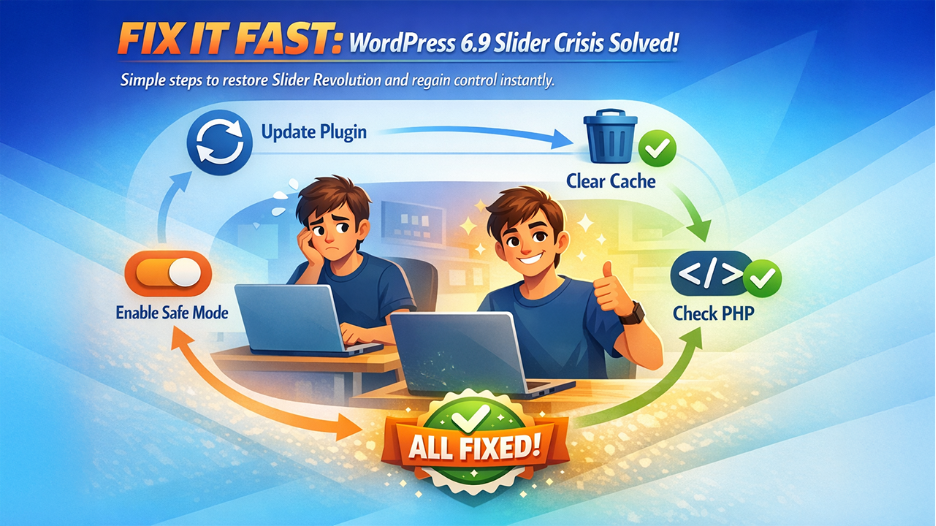
If WordPress 6.9 Slider Revolution broke on your site and you’re still dealing with the aftermath, here’s what you can do:
- Avoid Bline Downgrades: rolling back WordPress core to 6.8 without understanding the state of your plugins can create a different set of problems.
- Update Slider Revolution: Log into your ThemePunch account, download the latest release, and update via your WordPress dashboard or via FTP. ThemePunch pushed compatibility patches after the 6.9 release; if you’re still on an older version, that’s likely the entire problem.
- Clear All Cache: Your WordPress caching plugin, your server-level cache, your CDN cache, and your browser cache. Seriously, all of them. A surprising number of “still broken” reports after plugin updates are just stale cache serving the old broken version.
- Enable Safe Mode: some slider conflicts post-updates are caused by theme or other plugin JavaScript interfering. Temporarily disabling other plugins to isolate the conflict can pinpoint the issue quickly.
- Check PHP Version: WordPress 6.9 is optimized for PHP 8.2 and above. If your hosting is still running PHP 7.4 or 8.0, you may be seeing compounding compatibility issues beyond just the Slider Revolution.
- Contact ThemePunch Support: Contact ThemePunch support with your WordPress version, PHP version, and active plugins list for faster troubleshooting.
WordPress 6.9 Broke Slider Revolution? Emergency Fix If You Can’t Log In
Sometimes the damage runs deeper than a broken slider. If WordPress 6.9 left your site showing a white screen or a server error that simply refuses to load, you’ll need to work around WordPress entirely, and that means FTP.
Connect to your site via FTP or your hosting file manager and navigate to /wp-content/plugins/. Rename the entire folder to something like plugins-old. This kills every active plugin at once without needing admin access. Your site will load again at a basic level, but it’s alive.
Once you’re back in, rename the folder back to plugins and reactivate each plugin one at a time from the dashboard. The moment something breaks again, you know the cause.
If Slider Revolution is confirmed as the problem, but the dashboard still won’t cooperate, go manual. Download the latest release directly from your ThemePunch account, extract it, and manually editing WordPress files by replacing the /wp-content/plugins/revslider/ folder via FTP is straightforward once you know where to look.
While you’re in the hosting panel, check your PHP version too. WordPress 6.9 runs best on PHP 8.2 or above. If your server is still on 7.4, some of what looks like a Slider Revolution failure may actually be PHP compatibility noise underneath. And if nothing above gets you back in, call your host before touching anything else. Most managed WordPress hosting providers keep daily backups and can restore a clean version faster than any manual fix will.
Checklist to Prevent Issues After WordPress Updates (Avoid Slider Breaks)
Before updating WordPress, follow this quick checklist to prevent plugin conflicts and avoid issues like Slider Revolution breaking.
- Backup your database and files before any major WordPress update.
- Check your key plugin developers’ changelogs for compatibility issues.
- Update plugins before updating WordPress core, not after.
- Test on staging environment if your host provides one.
- Clear all caches after every update, not just when something breaks.
- Set major WordPress version updates to manual, not automatic.
- Review your approach to securing your WordPress site. Each major update is a good moment to audit active plugins, user permissions, and any outdated configurations.
Why WordPress Updates Break Plugins Like Slider Revolution
The thing about WordPress 6.9 Broke Slider Revolution is that it isn’t going to stop happening. WordPress 7.0 is already on the horizon, promising built-in AI features that go even deeper into the editor architecture. The platform is moving fast with faster sites, better security, and a more modern codebase.
But faster evolution means more chances for plugin conflicts. The WordPress ecosystem was never designed for zero friction major version updates. It was designed for flexibility, and flexibility comes with tradeoffs. The site owners who navigate this best aren’t the ones who know the most about PHP internals or WordPress architecture. They’re the ones who’ve simply built a small, repeatable process around updates. Back up, check changelogs, update plugins first, and clear cache. It takes maybe fifteen minutes extra per major release. This is how much it takes to avoid the broken slider on a Monday morning scenario.
Final Thoughts
If you’re a Slider Revolution user who got caught by the WordPress 6.9 update, don’t panic. ThemePunch has been around since 2012. They’ve navigated every major WordPress transition this platform has thrown at the ecosystem, and they’ll navigate this one too. The fix exists. What WordPress 6.9 broke was inconvenient. What it revealed about how we all handle updates is actually more valuable. Treat it as a one-time investment in a better habit. The WordPress 6.9 and Slider Revolution situation is ultimately a reminder that no plugin, no matter how established, is immune to a major core update. The teams that come out of this unscathed are the ones who stopped treating updates as routine clicks and started treating them as small but deliberate decisions.
%201.png)

%201.png)

%201.png)