
 Continue with Google

 Share on media
If you have been a fan of Minecraft and Solo Levelling, combining the two must be an experience that is worth pursuing. Configuring a Solo Leveling Reawakening Minecraft server enables you and your friends to delve into a thrilling RPG world full of monsters, dungeons, and a hunter progression system — all within the usual Minecraft environment. In this guide, let us understand everything you must know to set up your server and make it operational.
What Is a Solo Leveling Reawakening Minecraft Server?
The Solo Leveling: Reawakening modpack can be defined as an unofficial adaptation of the renowned Solo Leveling manhwa and anime series, developed by modder ProFake. It changes the simple Minecraft into an innovative RPG experience influenced by the world of hunters and gates.
In this modpack, players start as E-rank hunters and grow through the ranks by clearing dungeons, defeating monsters, and completing questions, much like the iconic journey in the Solo Leveling story. The modpack works on Minecraft Java Edition 1.20.1 with Forge and has garnered over 1.6 million downloads on CurseForge, ensuring it becomes one of the most prominent anime-inspired Minecraft modpacks available.
A Solo Leveling Reawakening Minecraft server improves this experience and takes it to the level of multiplayer, enabling player groups to hunt together, create guilds, and complete effectively in a shared world.
Key Features of the Modpack
- Hunter Progression System: Begin at E-rank and then make progress by clearing dungeons and increasing defeating powerful monsters.
- Dynamic Gates: Go through randomly generated Gates that vary in difficulty from E to S rank, each having valuable hoot and unique enemies.
- Skill and Stat Platforms: Elevate attributes like agility, strength, vitality, intelligence, and sense. Unlock abilities via a complete skill tree.
- Boss Fights and Custom Gear: Create and improve hunter-inspired armor and weapons. Deal with dungeon bosses who might use unique patterns of attack.
- Quest System: Finish daily missions to get rewards. Failing quests daily can send players to a Punishment zone, significantly growing the stakes.
How Can You Install the Solo Leveling Reawakening Modpack on Your Computer?
Before you create a Solo Leveling Reawakening Minecraft server, you must install the modpack client on your system to be able to connect as well as play.
Implement the following steps:
- Download as well as install the CurseForge Launcher from the official website of CurseForge.
- Next, you need to open the launcher and go to the Browse tab.
- In the modpack search bar, search for Solo Leveling Reawakening
- From the results, choose the modpack and then select “Install.”
- Once your download is complete, select Play to start the modpack.
Make sure that the version you need to install on your client aligns with the version that is running on your server to prevent connection problems.
How Can You Create a Solo Leveling Reawakening Minecraft Server?
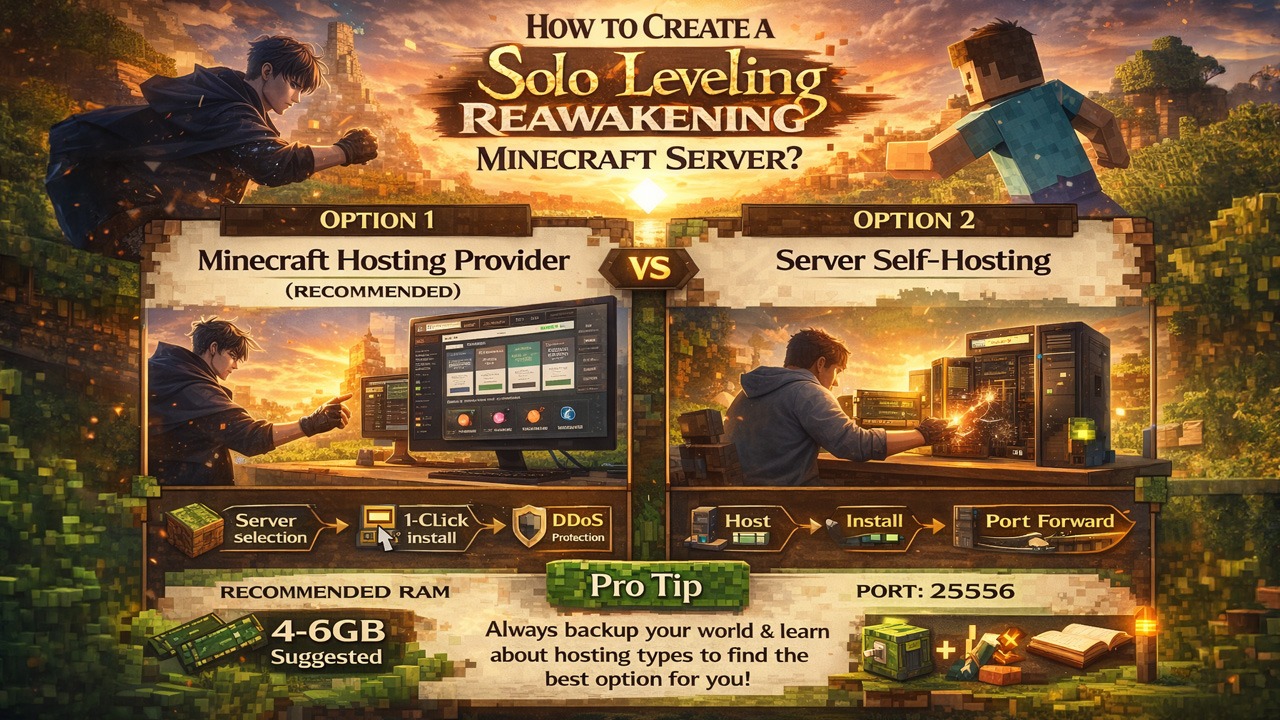
There are two main ways you can establish a Solo Leveling Reawakening Minecraft server: going for self-hosting or utilizing a managed hosting provider. For a lot of players, a Minecraft hosting provider is the simpler and more reliable option.
Option 1: Utilizing a Minecraft Hosting Provider (Recommended)
Managed hosting providers streamline the complete setup process. Many provide one-click modpack installation, DDoS protection, 24/7 uptime, and automatic backups — making them one of the most viable choices for running a Solo Leveling Reawakening Minecraft server.
Common steps you can use across majority of hosting providers:
- Select a hosting plan in Minecraft that provides support to CurseForge modpacks. Providers like Wabbanode, StickyPiston, and Scalacube provide support to the modpack Solo Leveling Reawakening.
- Finish your order and sign in to the control panel (a lot of providers utilize a custom panel of Multicraft).
- Go to the Modpacks section existing within the control panel.
- Find ProFake or Solo Leveling Reawakening in the modpack installer.
- Choose the latest version and select Install.
- Activate the server — it will restart automatically with the loaded modpack.
- Share the port and server IP (existing in your dashboard) with your peers so they can connect.
Recommended RAM: At least a 4-6 GB RAM is suggested for seamless experience with this modpack, especially for numerous players.
Option 2: Server Self-Hosting
If you wish to host the Solo Leveling Reawakening Minecraft server on your own hardware, implement the following steps:
- You can download the official server files for the modpack “Solo Leveling Reawakening” from CurseForge. The dedicated server modpack is given the title as “Solo Leveling – Reawakening Server (Solo Leveling Ultimate) by ProFake.”
- Make sure you have at least Java 17 or higher versions installed on your machine.
- Then, extract the server files that have been downloaded to a dedicated server.
- Then, run the given start script (start.sh on Linux/Mac or start.bat on Windows) to activate the server.
- Next, accept the Minecraft EULA (Minecraft End User License Agreement) by changing eula=true in the eula.txt file.
- Reboot the server. It will create all required files and start loading the modpack.
- Set up your server.properties file to configure your difficulty, set player limits, and other key preferences.
- You need to port forward your router (default Minecraft port is 25565) to allow external connections.
Important: Create a backup of your world files always before making any updates or modifications to avoid data loss.
Pro Tip: Learn more about hosting and types of hosting to find the most optimal option for you. Start your learning journey by learning about WordPress to understand how hosting impacts speed, overall reliability, and uptime.
Key Tips for Handling Your Solo Leveling Reawakening Minecraft Server
Smoothly running a Solo Leveling Reawakening Minecraft server needs a few right practices:
- Ensure that the modpack remains updated: New Solo Leveling Reawakening modpack versions are periodically released. Back up your world always before you update them. A lot of hosting panels can manage updates with just a single click.
- Allocate sufficient RAM: The modpack is quite intensive with resources. Insufficient RAM can lead to crashes and lag, specifically with more players playing online.
- Utilize Whitelisting for Private Servers: If your server is for friends only, allow the feature of whitelist via your control panel or server.properties file to limit access.
- Consistently Track Server Performance: Watch for any spikes in lag, specifically during boss fights or dungeon runs, and adopt view-settings if required.
- Frequently Back Up Your World: Automated backup platforms are available via the majority of hosting panels, making this quite simple and vital for securing progress of players.
Conclusion
Generating a Solo Leveling Reawakening Minecraft server is a simple process, irrespective of whether you select a managed hosting provider or choose to self-host. The modpack provides a specifically rich RPG experience rooted in the universe of Solo Leveling and playing it in multiplayer can take the immersion even further. By implementing the above-mentioned steps, from installing CurseForge client to setting up your server settings, you can have a completely functioning Solo Leveling Reawakening Minecraft server running for your group in just a matter of minutes. Select your hosting method, establish your server, and begin your journey from E-rank hunter to the most powerful character in the game.
%201.png)

%201.png)

%201.png)