
 Continue with Google

 Share on media
Starting a blog has become one of the best ways to share knowledge, develop a personal brand, and even make money online. If you’re wondering how to start a blog, this detailed guide will take you through every step you need to start a successful blog in 2026.
With the rapid growth of digital technology and the consumption of digital content, blogging is even more impactful for individuals as well as businesses. Whether you want to establish your authority in a specific niche, create multiple income streams, or just share your personal experience, starting a blogging website in 2026 can prove even more fruitful in more ways than ever before. Modern blogging tools, improved SEO practices, and flexible monetization options make it easier for beginners to succeed without technical expertise.
This guide is created specifically for beginners to provide a clear, step-by-step approach. It covers all aspects of blog creation, including finding a niche, installing WordPress, publishing content, growing traffic, and making money from your blog.
What Is a Blog and Why Start One
A blog is a kind of website where information is frequently published and usually takes the form of short articles. Blogs have several purposes:
- Share thoughts and experiences
- Teach specific topics or skills
- Review products or services
- Create a community of like-minded people
It’s all about creative expression, entertaining an audience, and bringing something into the world from scratch. Whether it be a hobby, a side hustle, or a full-time business, its core remains similar.
Step 1: Choosing Your Blog Niche
The choice of the niche sets the direction of your blog: what would be attractive for personal interest, probably dealing with your expertise, and offering growth potential.
The following are key considerations in the selection of a niche:
- Choose themes you particularly enjoy discussing over the course of everyday life.
- Identify experiences or skills worth sharing
- Ensure continuing interest during time
- Assess audience potential and monetization opportunities.
Focused niches develop better audiences. The chosen focus doesn’t have to be perfect to get started with; it naturally gets refined as the blog evolves.
Step 2: Setting Up Your Blog Foundation
Choosing WordPress.org
If you’re a serious blogger, then WordPress.org is the way to go. You fully control design, functionality, and monetization, unlike free blogging sites.
Advantages of WordPress.org:
- Free and Open-Source Software
- No coding is required.
- Full ownership of content
- Unlimited monetization options.
- Advanced capabilities for customization
Key Requirements
Three things needed to start:
- Domain name: The address of your blog
- Web hosting: where the files are held
- 30 minutes of setup time
Domain names are usually $14.99 per year, and hosting starts at $7.99 a month. Many web hosts will give discounts to first-time bloggers, along with bundling services together.
Choosing a Hosting Provider
Quality hosting provides speed, uptime, and technical support. Other recommended features in this regard include:
- Affordable pricing with domain included
- Fast servers and plenty of storage
- 24/7 customer support
- WordPress-optimized environment
Setup process:
- Hosting provider site visit
- Choose an appropriate hosting plan
- Choose and register domain name
- Finish purchasing and paying
- Access hosting control panel
Step 3: Installing WordPress
Most modern hosting providers install WordPress automatically when you sign up. This eliminates any technical hassle for beginners.
Access methods:
- Log in via hosting control panel
- Go directly to yoursite.com/wp-admin/
Once WordPress installation is complete, you can start customizing your blog.
Step 4: Designing Your Blog
The appearance of your blog is what every guest sees first. The themes in WordPress regulate visual presentation and do not require coding of any sort.
Installing a Theme
Navigation path: Appearance » Themes » Add New Theme
There are over 7,000 free themes available in the WordPress theme directory. Themes can be sorted according to popularity, date of release, or features.
Installation steps:
- Browse available themes
- Preview themes to visualize appearance
- Click “Install” on selected theme
- Activate theme to make it live
Customization Options
Access customization tools after theme activation:
Appearance » Customize For classic themes:
For block themes: Appearance » Editor
Personalization includes:
- Color and font adjustments
- Modifying layouts
- Adding logos
- Custom Headers and Footers
Advanced Design Tools
Page builders provide you with extended design control through drag-and-drop interfaces. Examples include SeedProd and Divi, which let you create custom pages without coding.
Design principles:
- Keep clean, simple layouts
- Readability first
- Mobile responsiveness ensures
- Keep navigation intuitive
Step 5: Creating Your First Blog Post
The principal activity of blogging involves writing and publishing content. WordPress’s block editor makes creating that content much easier.
Writing Process
Navigation: Posts » Add New
It also offers flexibility in layout, and users can add blocks of text, images, videos, buttons, and many more. You can also customize your WordPress Writing Settings by navigating Settings » Writing to set default categories and post formats.
How to publish:
- Write post content
- Headings and formatting
- Insert images or media
- Categorize and tag your entries
- Click “Publish” button
Content Organization
Categories: Grouping related content into broad topics.
Tags: Some specific keywords describing the post details
It helps readers find related content and is good for site navigation.
Content Ideas and Planning
Structured approaches make it easier to find the topics of posts:
- Use blog post idea generators
- Research topics trending in your niche.
- Common reader questions and addressing them.
- Perform keyword research for SEO
- Create content calendars for consistency
Just publish, to begin with, not perfection. Publishing consistently gives a person momentum, and his or her skills develop over time.
Essential Blog Monetization Methods Comparison
| Monetization Method | Difficulty Level | Initial Investment | Time to Profit | Potential Revenue | Best For |
| Google AdSense | Easy | None | 3-6 months | $100-$500/month | Beginners with growing traffic |
| Affiliate Marketing | Medium | None to Low | 4-8 months | $500-$5,000+/month | Bloggers with engaged audience |
| Selling Digital Products | Medium to Hard | $100-$500 | 6-12 months | $1,000-$10,000+/month | Experts with specific skills |
| Selling Physical Products | Hard | $500-$2,000 | 6-12 months | $1,000-$20,000+/month | E-commerce focused blogs |
| Membership/Subscriptions | Hard | $200-$800 | 8-12 months | $500-$10,000+/month | Authority blogs with loyal audience |
| Sponsored Content | Medium | None | 6-9 months | $200-$2,000/post | Niche blogs with quality content |
| Online Courses | Hard | $300-$1,000 | 8-15 months | $2,000-$15,000+/month | Educational blogs with expertise |
Step 6: Install the Necessary Plug-ins
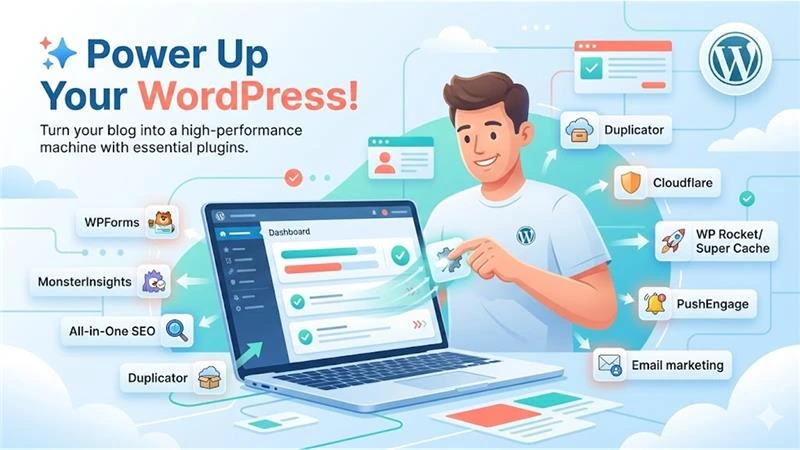
Plug-ins are plug-and-play modules that enhance the basic functionality of WordPress. Understanding how to start a blog properly means knowing which essential plugins to install. There are more than 59,000 free plug-ins in the WordPress directory!
Contact Form Plug-in
Contact Forms are a very useful way for readers to reach out to you with questions and/or feedback (or for business inquiries).
Recommend: WPForms
- Easy to create with a drag-and-drop interface
- Comes with pre-built templates
- Includes follow-up features built-in
Available for a fee starting at $49.50/year (free version available)
Analytics Plugin
The understanding of how an audience behaves and the patterns of how traffic flows provide insights that help companies continue to refine their content strategies over time.
Best Recommendation: MonsterInsights
- Beginner-friendly configuration
- Showcases a dashboard for analytical information
- Offers the ability to perform extensive tracking
Pricing: You can download the free version and find additional paid subscriptions starting at $99.60 annually.
SEO Plugin
Search Engine Optimization drives organic traffic from search engines.
Recommended: All in One SEO
- Setup wizard for beginners
- Sitemap generation
- Schema markup tools
- Meta description optimization
Pricing: Available on a free version, paid plans start at $49.60/year.
Backup Plugin
Regular Backups, site migrations: it protects against data loss.
Recommended: Duplicator
- Automate Backup Schedules
- Easy migration process
- Complete site archives
Pricing: Free version available | Paid plans start from $49.50/year
Additional required tools
Security: Cloudflare offers protection layers at no cost. Follow comprehensive security guides to harden WordPress installations. Regular WordPress maintenance ensures your site remains secure against vulnerabilities and threats.
Performance: WP Rocket (premium) or WP Super Cache (free) provide some of the best web page loading speeds by way of their caching and optimization features.
Email Marketing: When using email marketing software, creating email lists means you have direct access to reaching your audience via email. Email marketing companies allow you to send and manage an electronic newsletter to your customers.
Push Notification: PushEngage re-engages visitors by sending browser notifications to drive repeat traffic.
Step 7: Expand Your Range of Audience
Creating an engaged readership is dependent upon how you successfully act as a strategic marketer with your promotions and engagement strategies.
SEARCH ENGINE OPTIMIZATION
SEO can produce sustained organic traffic to your site. The following steps need to be completed before implementing the SEO process:
- Installing SEO Plugins;
- Creating Meta Descriptions for All Web Pages; Creating XML Sitemaps
- Implementing Schema Markup
- Creating Quality Backlinks
- Conducting Keyword Research
Building An Email List
Email marketing builds a 1-to-1 relationship with your audience.
Pros:
- To get readers to return and consume new content
- To inform readers about your products or services
- To create a sense of community
- To create repeatable traffic flows
Implementation:
- Email Marketing Service Selection
- Install opt-in forms.
- Create lead magnets
- Segment audience
- Send regular newsletters
Build high-converting opt-in forms such as pop-ups, slide-ins, and embedded forms with the help of tools such as OptinMonster.
Push Notification Strategy
Using push notifications, businesses can contact users mobile and desktop web browsers through messages.
Benefits:
- Re-engaging past customers who left the store through the web
- Promoting new content on their website
- Recovering abandoned cart purchases and items in the shopping cart.
- Sending customized notifications that target each user’s interests and preferences.
Social Media Marketing
Social platforms drive traffic, build community engagement.
Strategies:
- Schedule posts automatically
- Share content across platforms
- Engaging with followers
- Embed social feeds on blog
- Utilize platform-specific features.
ClickSocial is an automation tool for social media posting, whereas Smash Balloon embeds social feeds directly onto WordPress sites.
Content Marketing
Consistent, quality content remains the basis for expanding your audience.
Best practices
- Publish regularly
- Answer reader questions
- Deliver actionable value
- Use various media types
- Optimize for search intent
Step 8: Monetizing Your Blog
A financially viable and profitable blog contains several streams of revenue.
Online Ads
AdSense connects bloggers to advertisers. Advertisers place bids on the most relevant keywords.
How to get started:
1. Sign-up for an AdSense account
2. Add the AdSense code to your WordPress Site
3. Your blog will automatically show ads
4. You will be paid per click or impression.
Affiliate Marketing
Promoting products and services for commissions on resulting sales.
Implementing:
- Joining affiliate programs
- Using link management plugins like Pretty Links or Thirsty Affiliates
- Disclosing affiliate relationships
- Recommending only high-quality products
- Tracking the performance metrics
Selling Products or Services
Create and sell your own offerings.
Digital products:
- eBooks
- E-learning courses
- Templates
- Software
- Printables
Physical products:
- Merchandise
- Books
- Equipment
Sell digital products using Easy Digital Downloads or sell physical goods using WooCommerce.
Membership and Subscriptions
Offer high-value content or course material behind paywalls for recurring revenue.
Options:
- Subscription access to premium content
- Online course enrollments
- Community memberships
- Coaching or consulting packages
Among various premium membership plugins, MemberPress is one that really makes creating a membership site much easier by offering several capabilities like content restriction, subscription management, and course delivery.
Step 9: Mastering WordPress
Continuous learning helps the blogger to enhance his or her effectiveness and technical capabilities.
Resourceful Materials
Terms Unique to WordPress: A knowledge of technical terminology is necessary for resolution assistance; also for effective communication between users.
Video Help: Step-by-step instructional videos for specific processes and procedures.
Documentation For Long-forms: Articles about How to fix common eye problems and other more complex subjects.
Community Support
Join WordPress communities for:
- Asking questions
- Experience sharing
- Peer Networking
- Discovering new techniques
Search Strategy
Use a search engine with relevant keywords to quickly find helpful tutorials and solutions.
Niche blogging
Focused areas of interest attract target audiences to niche Blogs.
Popular Options for Niches Include:
Travel Blog – Share your experiences of travel and tips with other travelers.
Food Blog – Share with an entire community who loves to eat. Provide recipes and cooking skills.
Fashion – Discuss fashion trends, style ideas, outfit ideas, etc., to a community of those that are interested in it.
Video blog – The creation of video content to engage and connect with your audience via storytelling using videos.
Factors to Selecting a Niche:
- Passion and Skills
- Demand vs. Competition
- The Ability to Make Money
- How to Sustainably Create Content
A “niche” is a targeted area for a blog to build authority and establish relationships with readers. Over time, a blog can broaden its target audience, or even create more than one niche, but still keep its focus on that original niche.
Final Thoughts
The blog, started in 2026, will open a window to creative expression, building a community, and earning money. It is about being consistent, patient, and learning all the time.
The roadmap below takes you through a step-by-step process on how to start a blog, right from choosing a niche. Each subsequent step can be taken in building a better and sustainable platform.
First, create value for your readers through consistency, then develop methods to expand organically over time. Rarely is it just one critical moment in time that provides that spark toward success; it is usually a process.
Key Takeaways:
- First, choose a niche that you will enjoy and are good at.
- Invest in quality hosting for long-term success.
- Quality over quantity in any content.
- Build email lists from day one
- Apply SEO principles consistently.
- Diversify monetization channels
- Be constantly active in your community.
- Learn and adapt constantly
That one post starts your blogging journey. Take the first step today and create something remarkable for tomorrow.
FAQs
Is blogging possible without WordPress?
Yes, other blogging platforms exist. But for the serious blogger, WordPress presents the best combination of freedom, ownership, and monetization capabilities.
Is it possible to make a blog without hosting?
No, it’s not. Hosting is quite necessary; web hosting hosts your blog files and makes them accessible on the internet.
Does it cost anything to start a WordPress blog?
The software is free but hosting and domain names are not. There are free WordPress.com blogs, but they have some substantial limitations when trying to customize or monetize.
How much does it take to start a blog?
The costs vary according to the selected hosting plan and tool. Simple blogs can start off for less than $100 per annum, while professional setups may require an upfront investment in the range of $300-500. Most of the tools come with free trials, with money-back guarantees.
Can I create a blog and start making money with Google AdSense?
Absolutely, Google AdSense is the most popular blog monetizing option. It is very easy to put in place, and when traffic starts growing to at least decent levels, it can bring in some passive income.
%201.png)

%201.png)

%201.png)